Advanced Cluster Security (ACS) Admission Controllers
Each OpenShift (or Kubernetes) Cluster secured by Advanced Cluster Security has an Admission Controller that will enforce ACS policies:
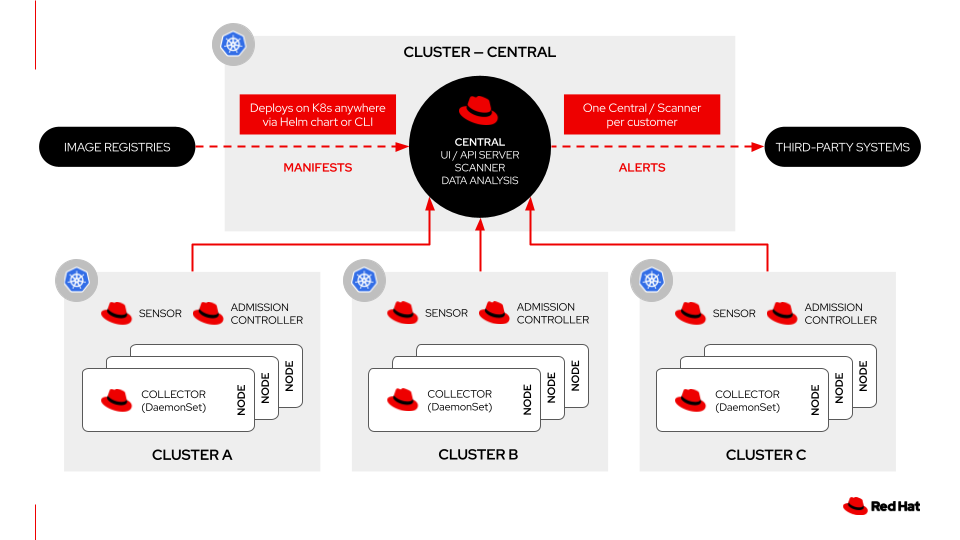
ACS Secured Clusters
When you log into the {acs_url}[ACS Console^,window="acs"] (with user {acs_admin_user} and password {acs_admin_password}) you can find the "secured clusters" und "Central Control" and their configuration by going to "Platform Configuration" and "Clusters" (1)
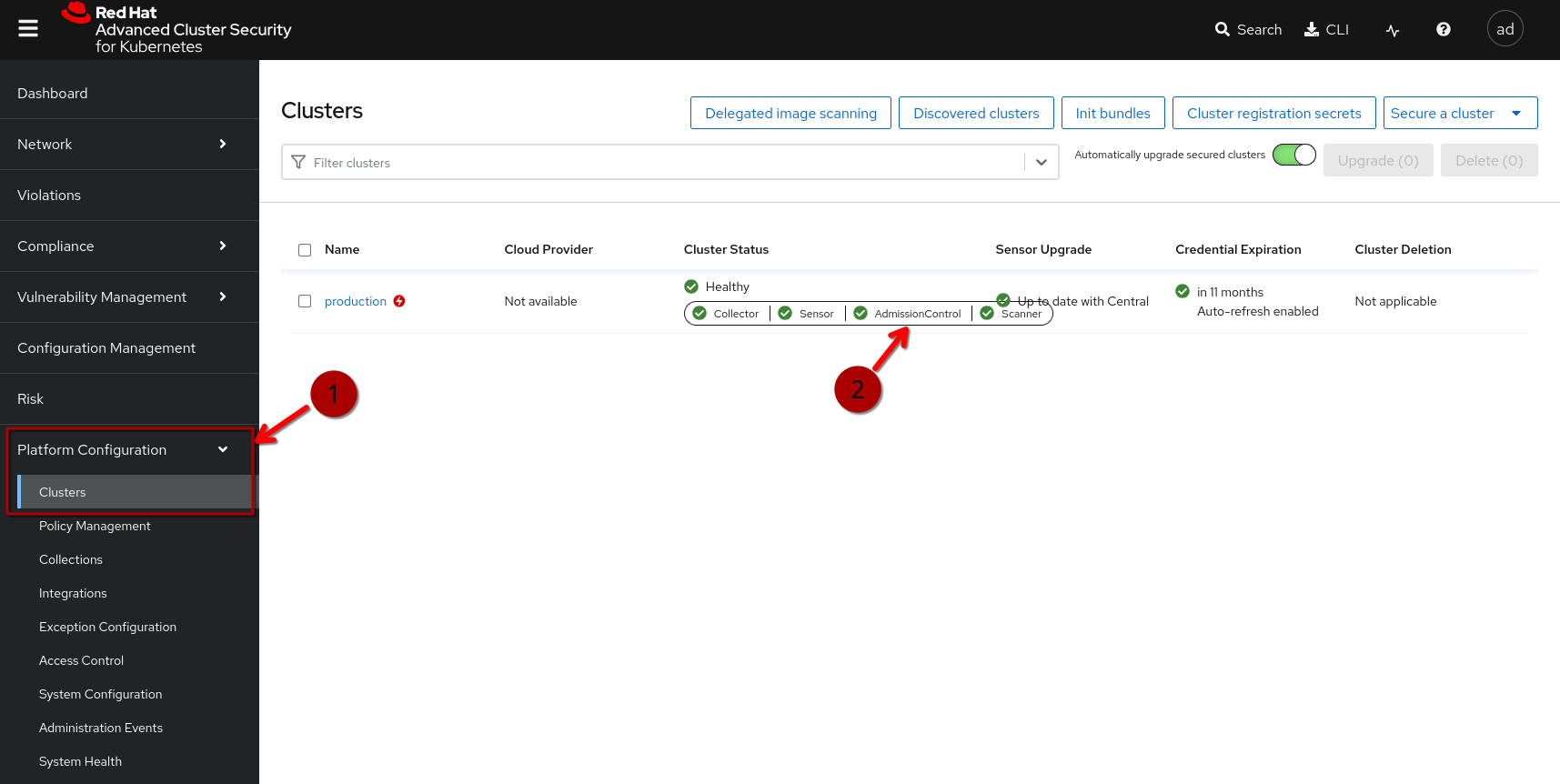
You can also {acs_url}/main/clusters[click here^,window="acs"]
When you click on the Cluster Status, you can open a detailed view, which will also give you the status of the admission controller for this "Secured Cluster":
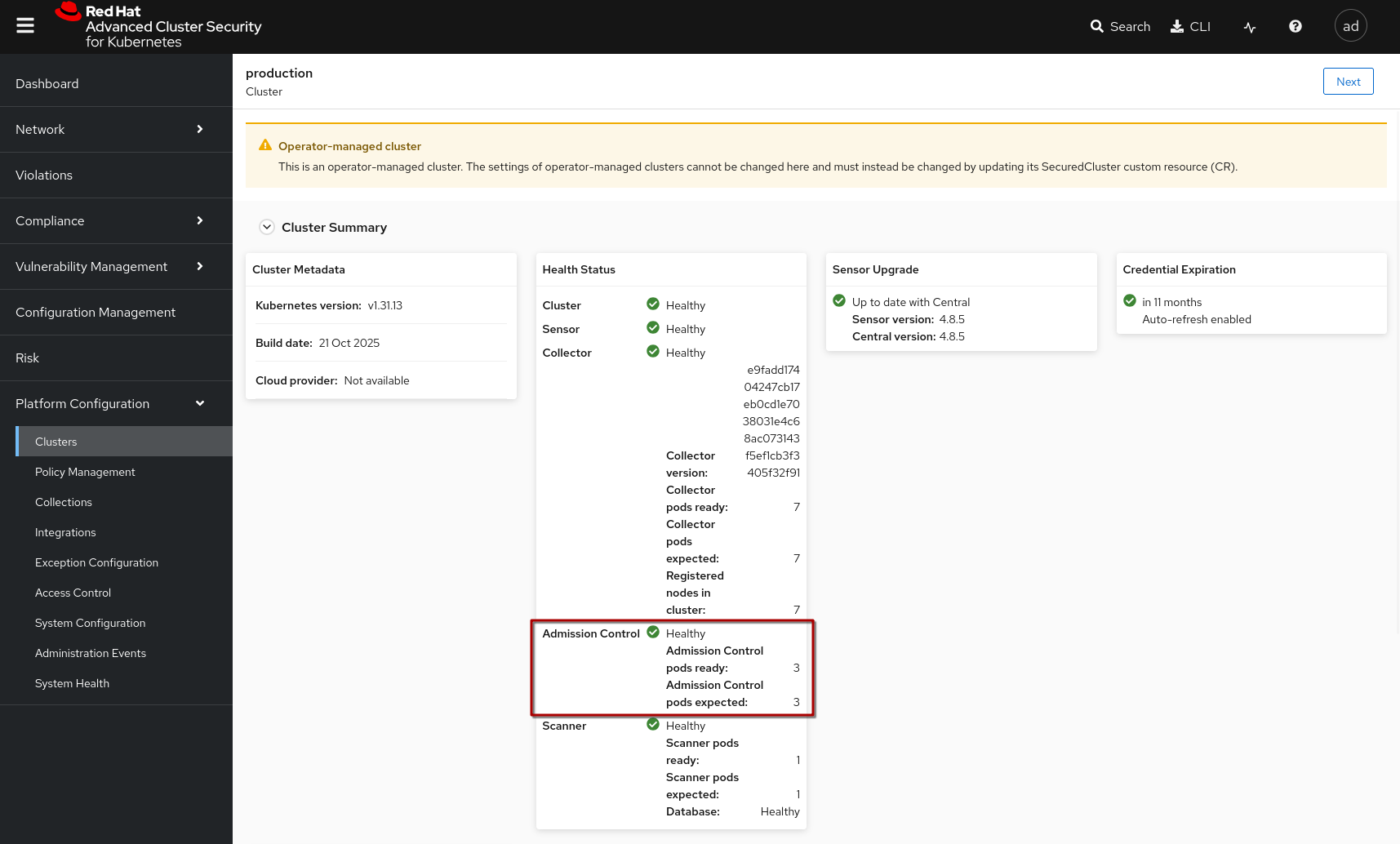
Admission Controller and Policies
When you go to the {acs_url}/main/policy-management/policies["Policy Management" View^,window="acs"] (also under "Platform Configuration") you will see a lot of policies, also with several "Lifecycle" stages.
For the Admission Controller, only the "Deploy" lifecycle stage is of relevance - it will evaluate the policy (if active and properly defined) on deployment and act on it (Inform or Inform&Enforce = Block the Deployment).
-
The "Build" Lifecycle applies to policies that can be used during the build phase, in other words by using
roxctlin a CI or some other script environment. -
The "Runtime" Lifecycle continuously monitors running Pods, for example if we want to detect (and avoid) a container starting e.g. "curl" or "dnf" for possible side-loading attacks.
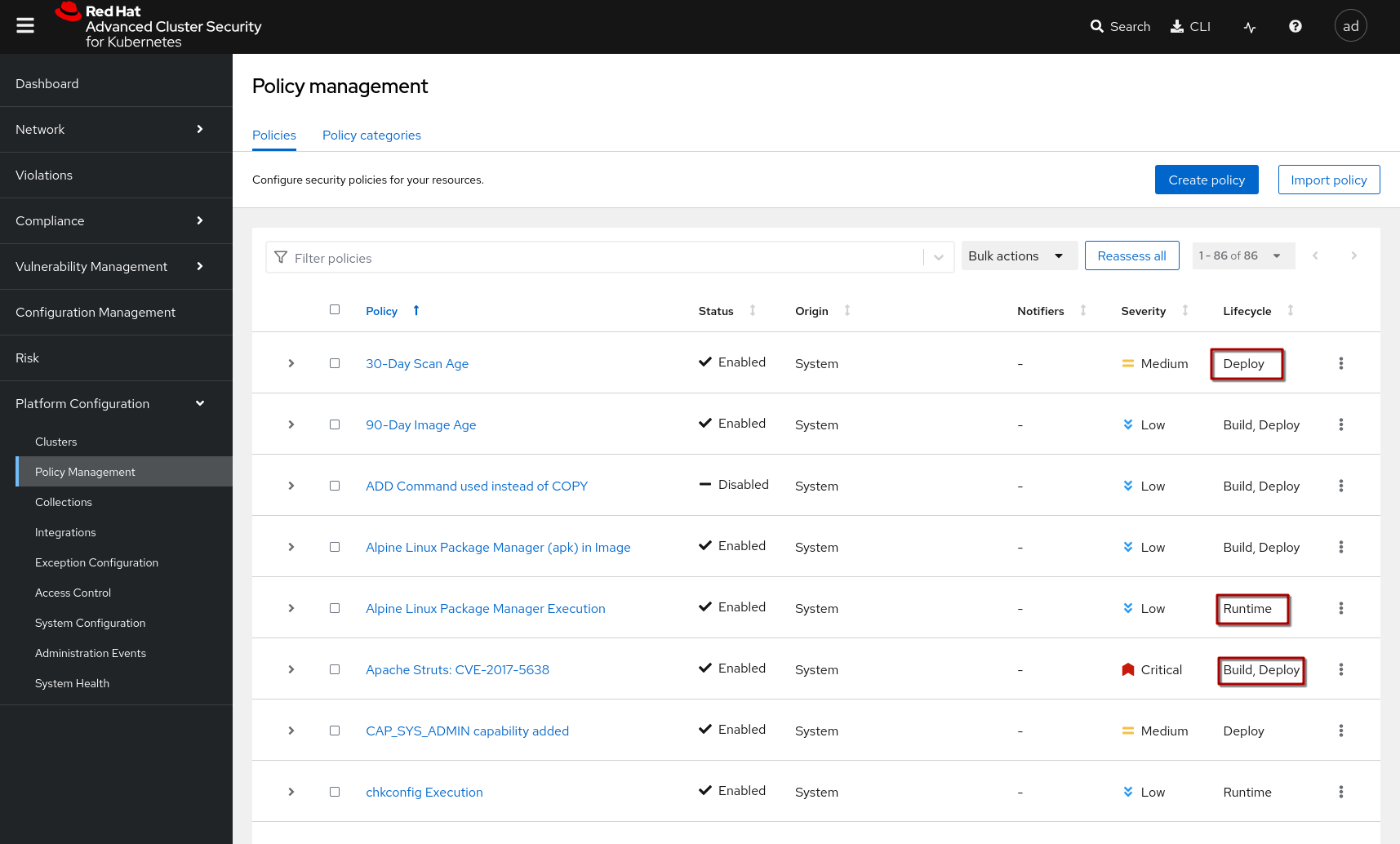
If you filter by the {acs_url}/main/policy-management/policies?s%5BLifecycle%20Stage%5D=DEPLOY["DEPLOY lifecycle"^,window=acs], you can see all system policies that have been defined for the deployment (i.e. can be enforced by the ACS Admission Controller)
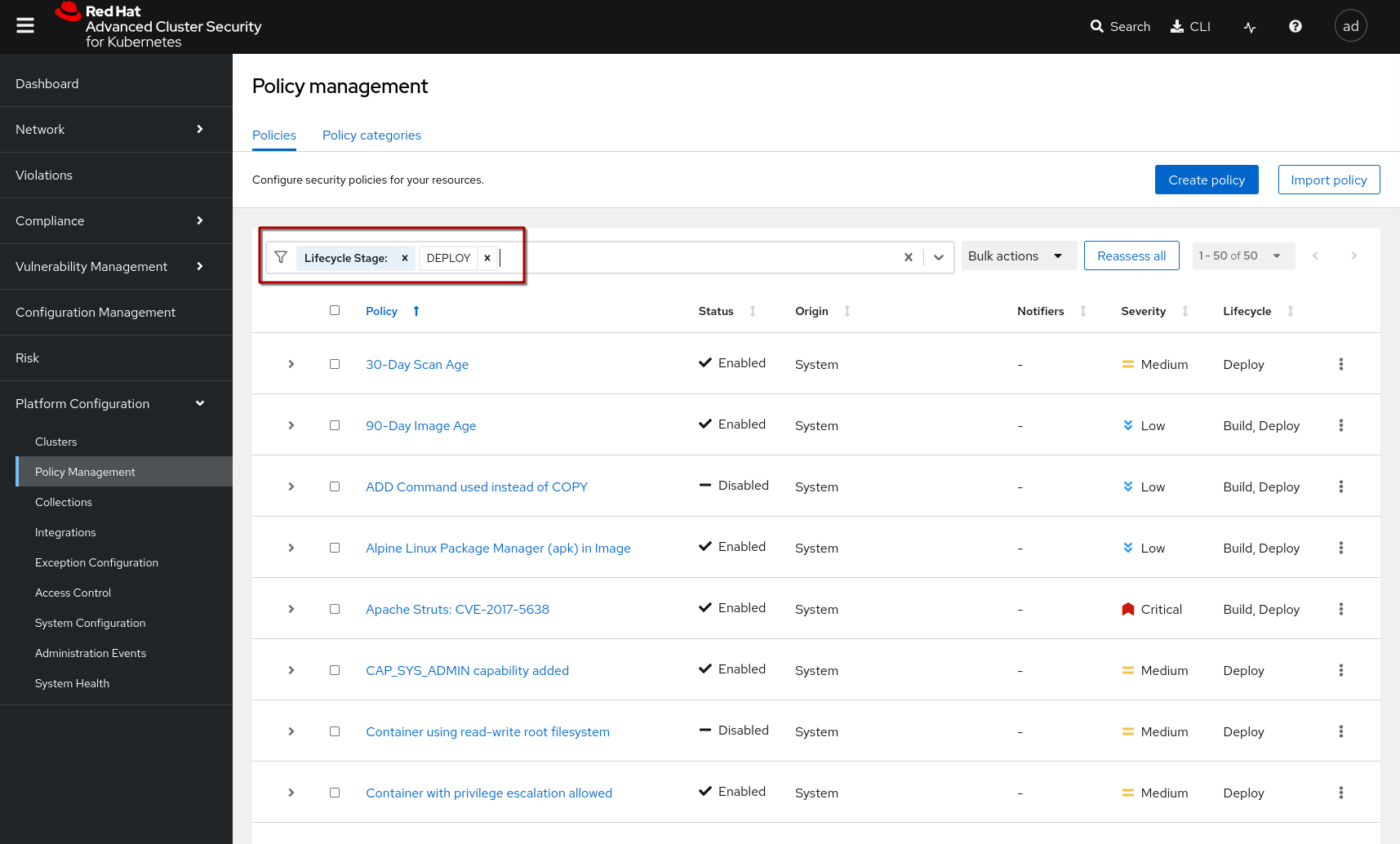
As you can see, ACS focuses more on the vulnerability side of security, where the Sigstore Admission Controller focuses on the integrity and attestations.
Checking for valid signatures is where they have an overlap, so let’s create policies that
-
check for a valid signature
-
check the number of vulnerabilities is below a certain threshold
-
will block a deployment if violated
|
Generally ACS supports (and recommends) to keep policies focused on one specific task (e.g. check for a valid signature). This way, they can be re-used and configured separately. |
Preparation: Adding Trusted Image Signers
Before we build a policy that verifies what a "good signature" is, we need to define an "Integration", namely a "Signature Integration":
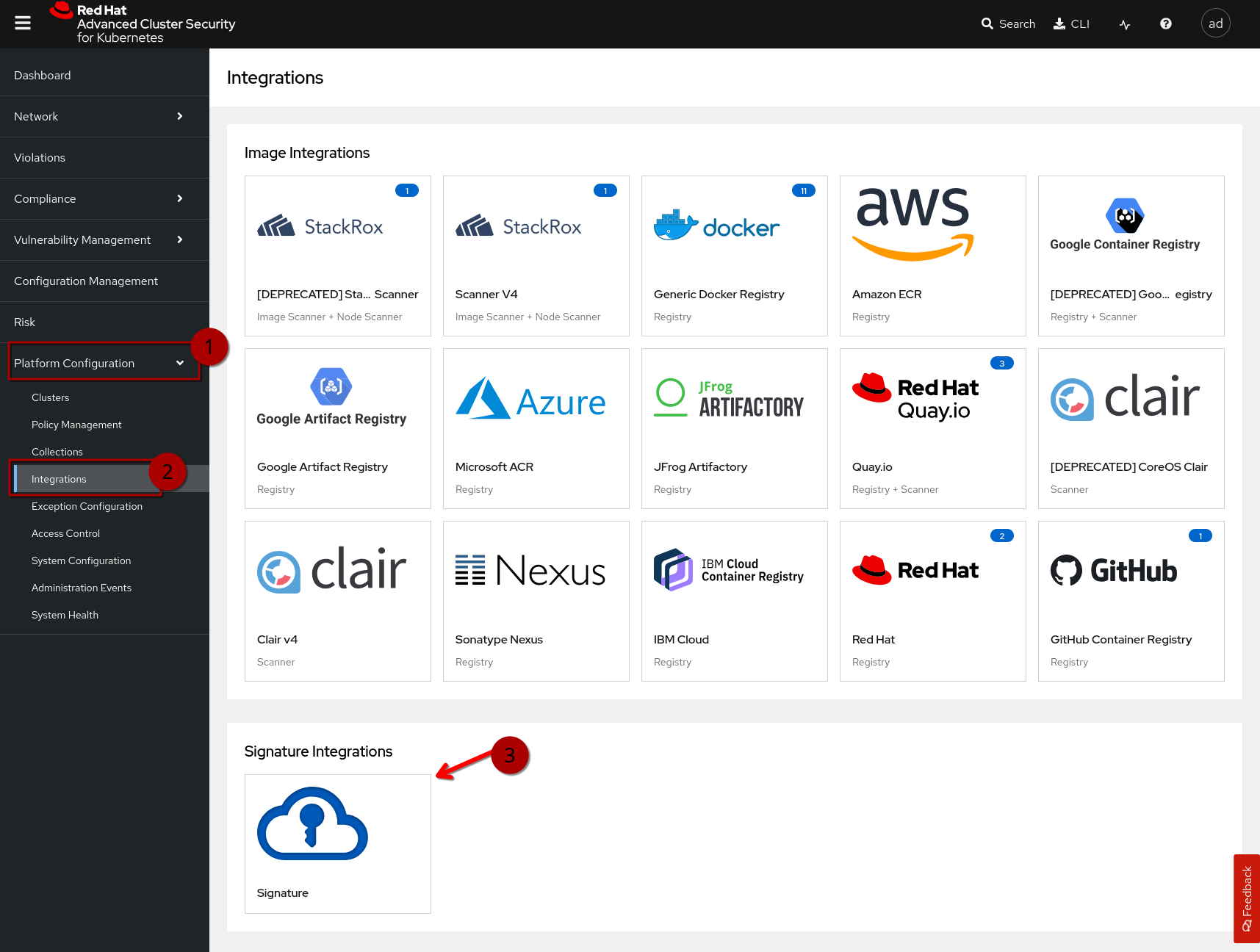
Go to "Platform Configuration" (1) - Integrations (2) - Signature Integrations (3), or {acs_url}/main/integrations/signatureIntegrations/signature[click here^,window="acs"] then click on "New Integration"
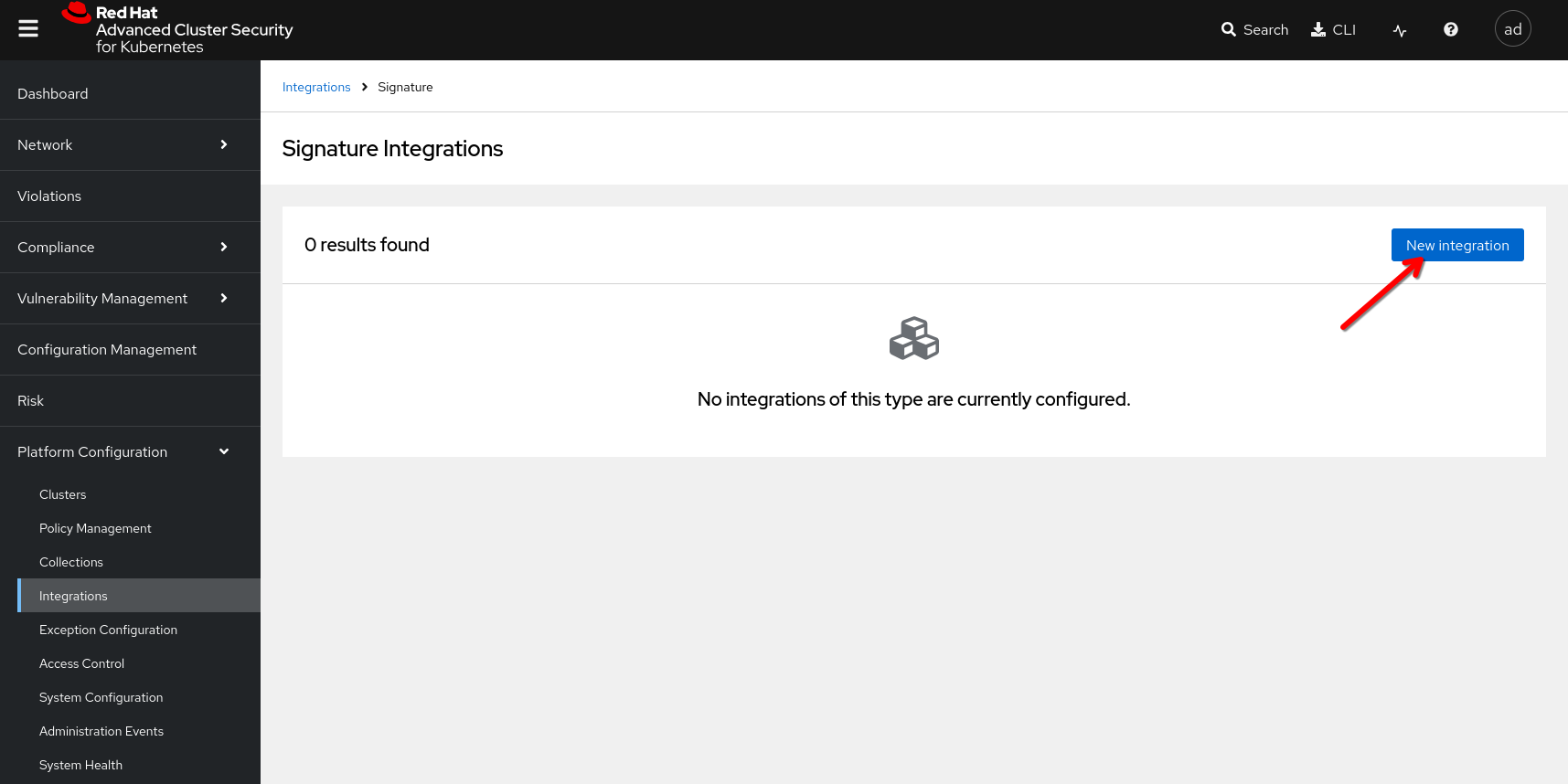
Key verification
We can add more than one key to validate images - so images from multiple signature sources can be validated with the same signature integration.
We can also create multiple integrations with a single key each.
Keyless verification
Another option (can also be used in the same integration) is to verify "keylessly signed" images by providing the RHTAS endpoints.
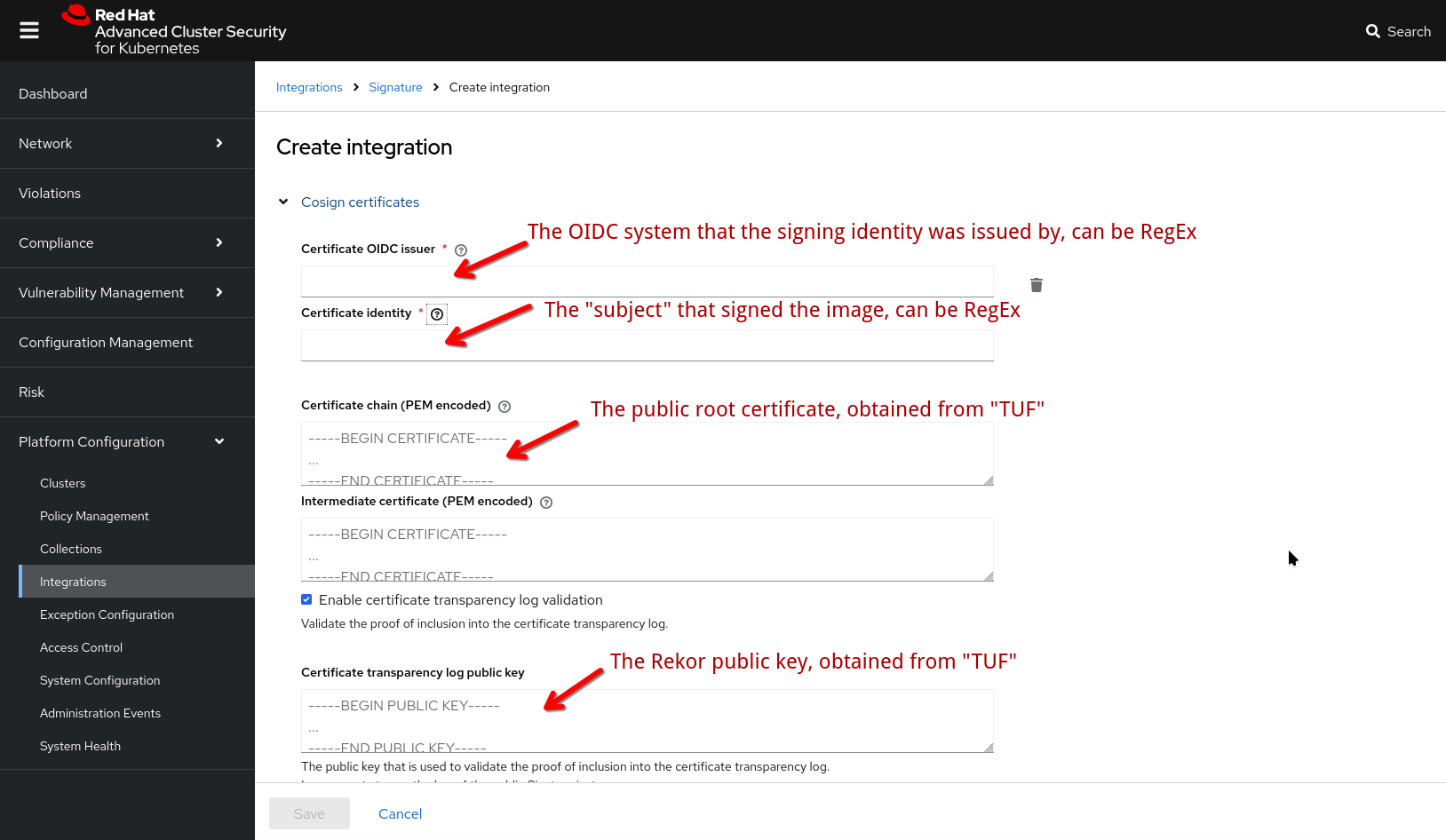
If we want to verify proof-of-inclusion with the Rekor transparency log (proof that the signing event has happened and has been recorded), we can configure that also - or disable, but that would be less secure.
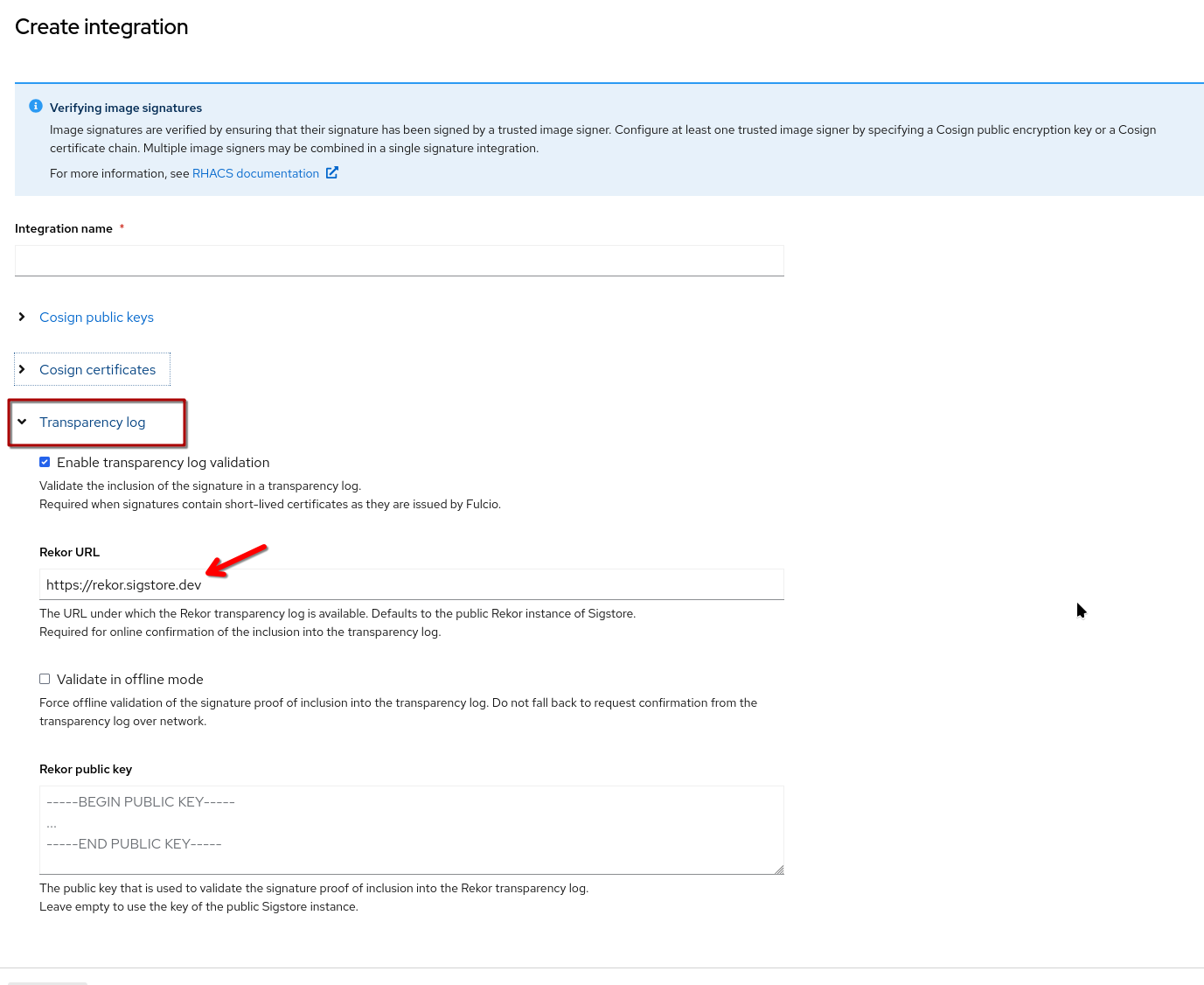
| For keyless signing/verification the Transparency log is typically part of the process - for "key-ful" signing, this is recommended, but not required. Therefore we have somewhat redundant fields here. One Rekor configuration tied to the "keyless" verification and one general one. This might change in the future. |
Creating the integration
With that said, let’s create a new Integration.
1) {acs_url}/main/integrations/signatureIntegrations/signature[Start here^,window="acs"] and click on "New Integration"
2) Give it a name, such as "Cosign Keys"
3) We have prepared a script that prints all the configuration data you need. Go to the terminal here and run this script:
|
If you have restarted your cluster or terminal pod, you will not have the helper scripts available. In that case, first clone them again: and the following command will work. |
cd /workspace/l3-enablement-helpers/tas-tssc/controllers/acs
./get-signature-integration-info.sh
You will get a printout similar to this one (yours will be different)
==========================================
ACS Signature Integration Configuration
==========================================

==========================================
Section: Cosign Public Key
==========================================

Public Key Name: cosign.pub

Public Key Value:
-------------------
-----BEGIN PUBLIC KEY-----
MFkwEwYHKoZIzj0CAQYIKoZIzj0DAQcDQgAEZikcD8YR+C/ztTzhkzLO4fyOtJF0
h/dLYKfC7zcIQQ46U6b7G0NrLZ0R2M7TnY0LATWMcWRrq7ok4hrBpmn/pw==
-----END PUBLIC KEY-----

==========================================
Section: Transparency Log
==========================================

Rekor URL:
-------------------
https://rekor-server-tssc-tas.apps.cluster-vtm4r.dynamic.redhatworkshops.io

Rekor Public Key:
-------------------
Initializing cosign (this may take a moment)...
Cosign initialized successfully

-----BEGIN PUBLIC KEY-----
MFkwEwYHKoZIzj0CAQYIKoZIzj0DAQcDQgAEA5stoARjjvmULrZodK4a3aRYTnIA
/KpMwc/8G/+4uK01Qb1MRL+ZS0sD2TmXQ0si1ky/yJ3ZMft5F5dCGRL9pQ==
-----END PUBLIC KEY-----
Now copy the values over - it will look similar to this (your values will be different) - then click "Save"
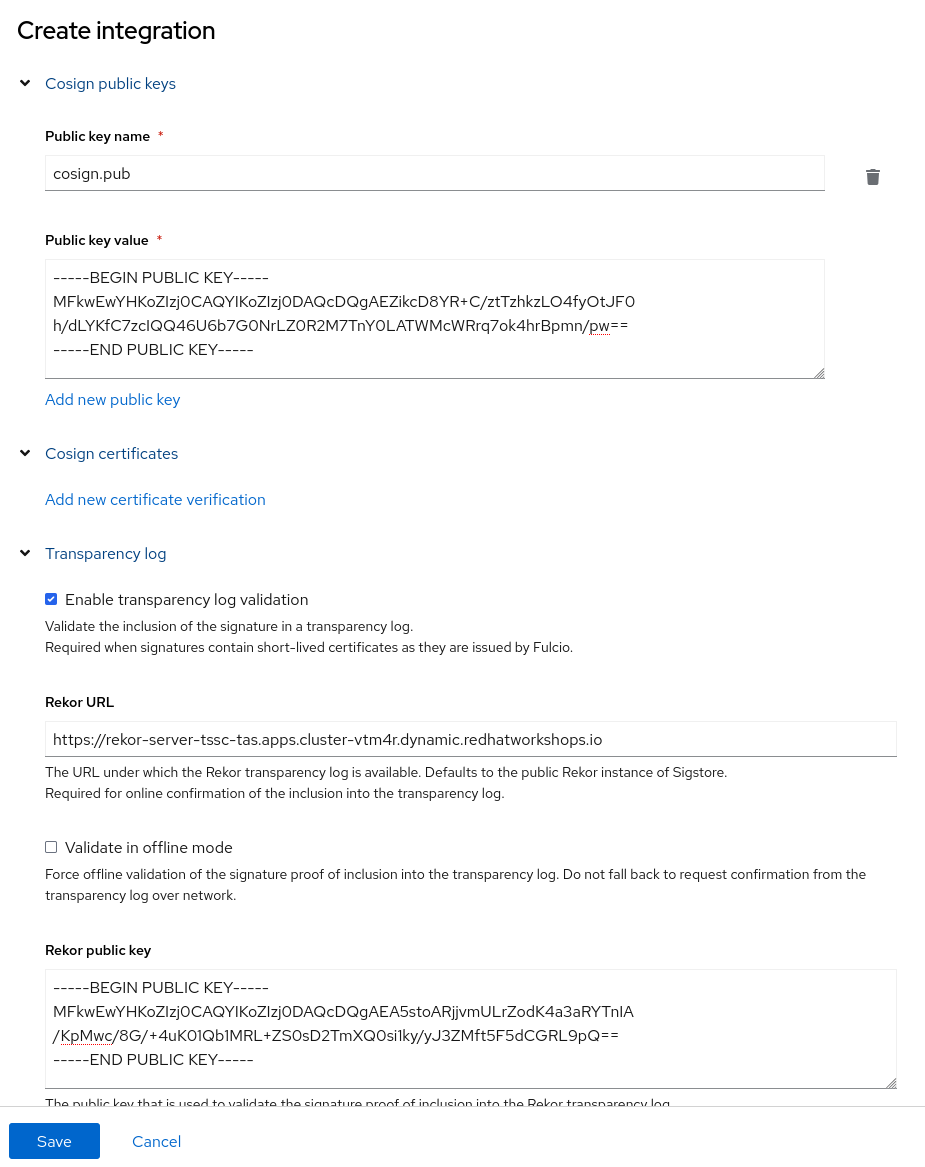
When you {acs_url}/main/integrations/signatureIntegrations/signature[click here^,window="acs"], you should now have a new "Signature Integration" with our keys that Tekton Chains (and we) used to sign images.

Creating Policies
Before we create our policies to test with, let’s quickly create a new namespace. Why, you ask?
Because our previous testing namespace (student-admission-test) is still being watched by our ClusterImagePolicy from the previous chapter - because we labelled that namespace accordingly with policy.rhtas.com/include=true.
We don’t want two Admission Controllers step on each other’s feet, because both will be validating the signature - therefore we use a new namespace. More on that (and how ACS policies can be scoped) later.
oc new-project student-acs-testNow let’s go to the {acs_url}/main/policy-management/policies["Policy Management" View^,window="acs"] and then
1) Click on "Create policy"
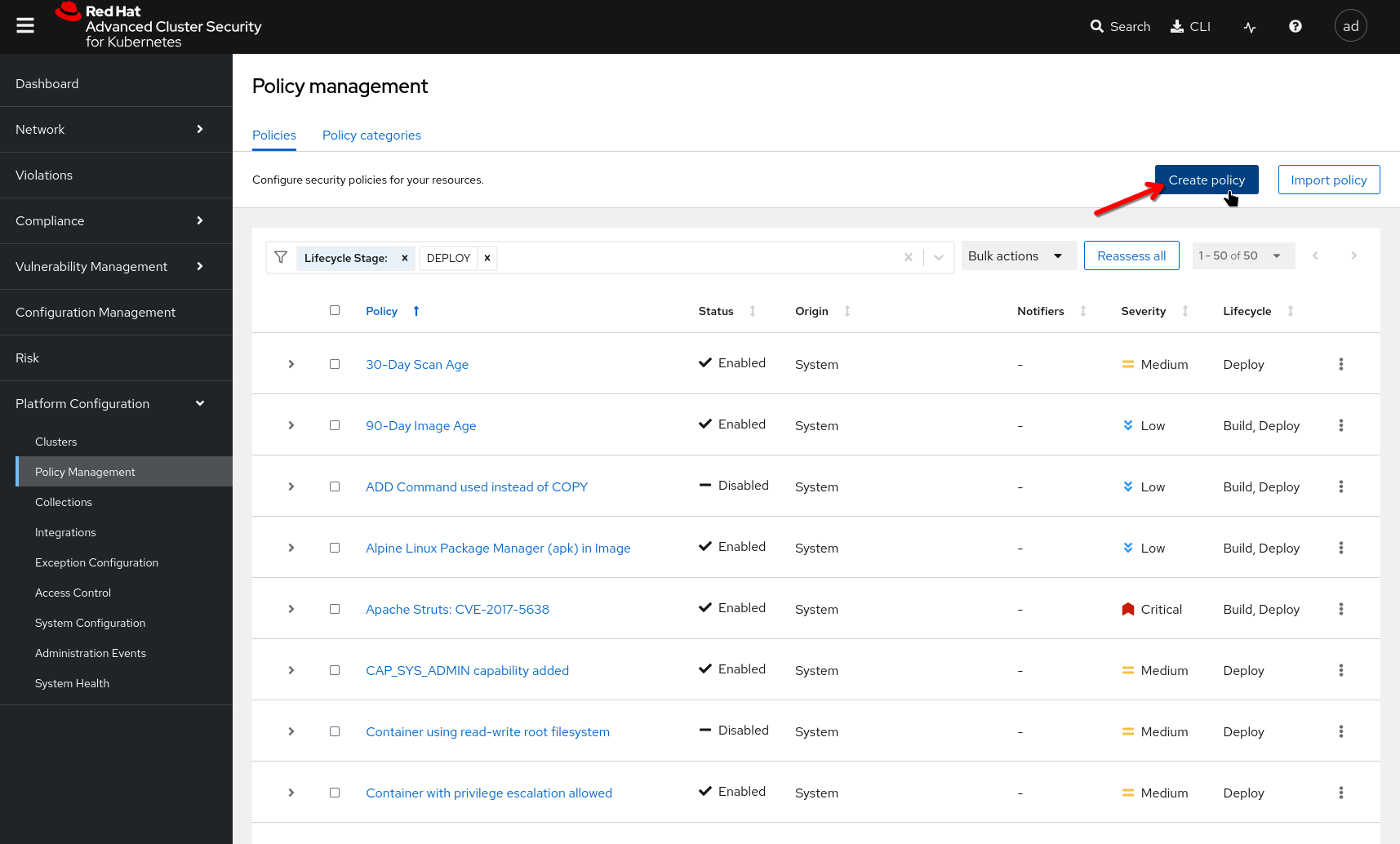
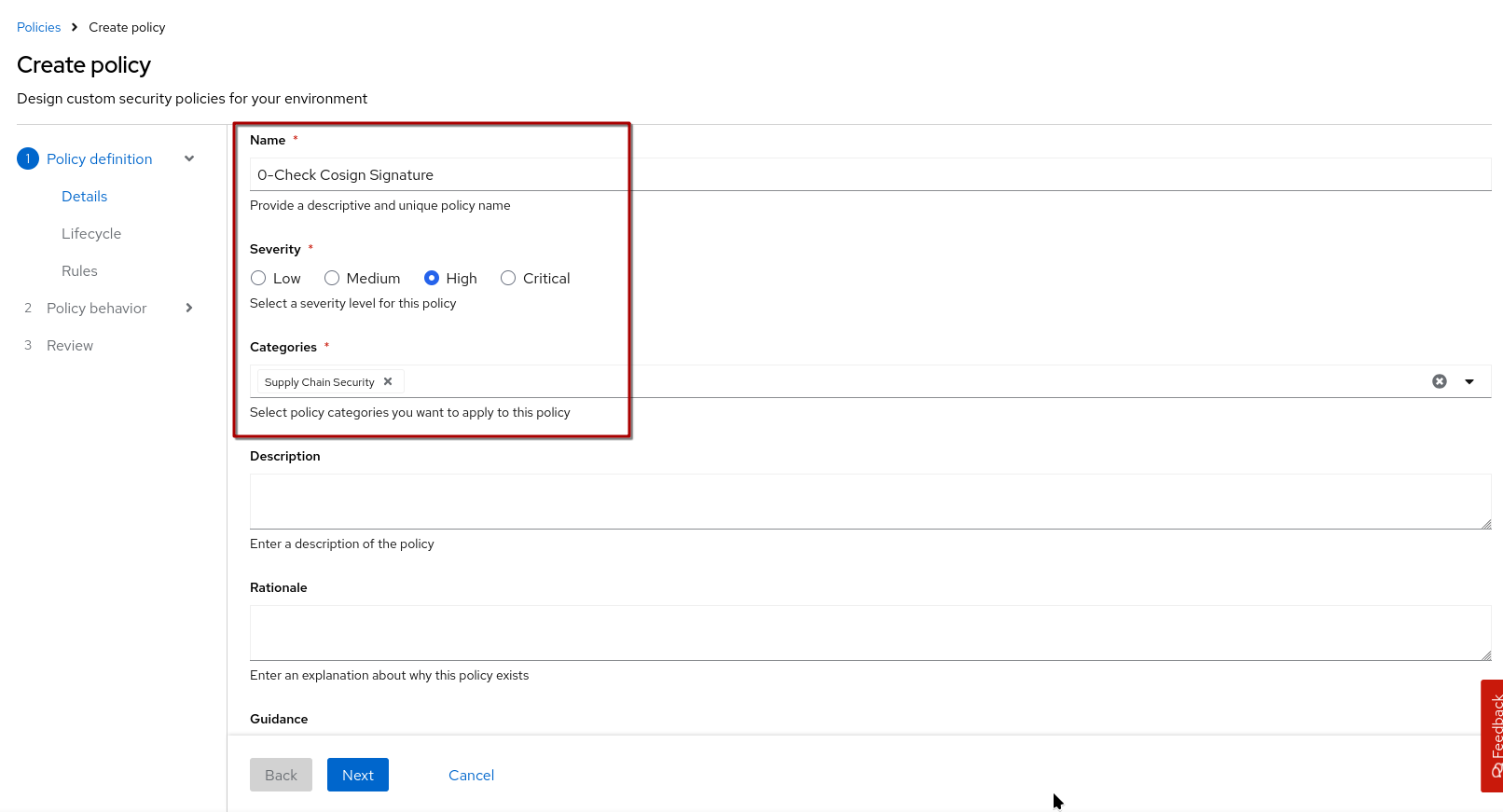
2) Give it a name (HINT: Start the name with "0-" so it’s easier to find later), severity and pick a category - if you want you can also provide a description, rationale and remediation guidance, which will be displayed on policy violation.
Click "Next"
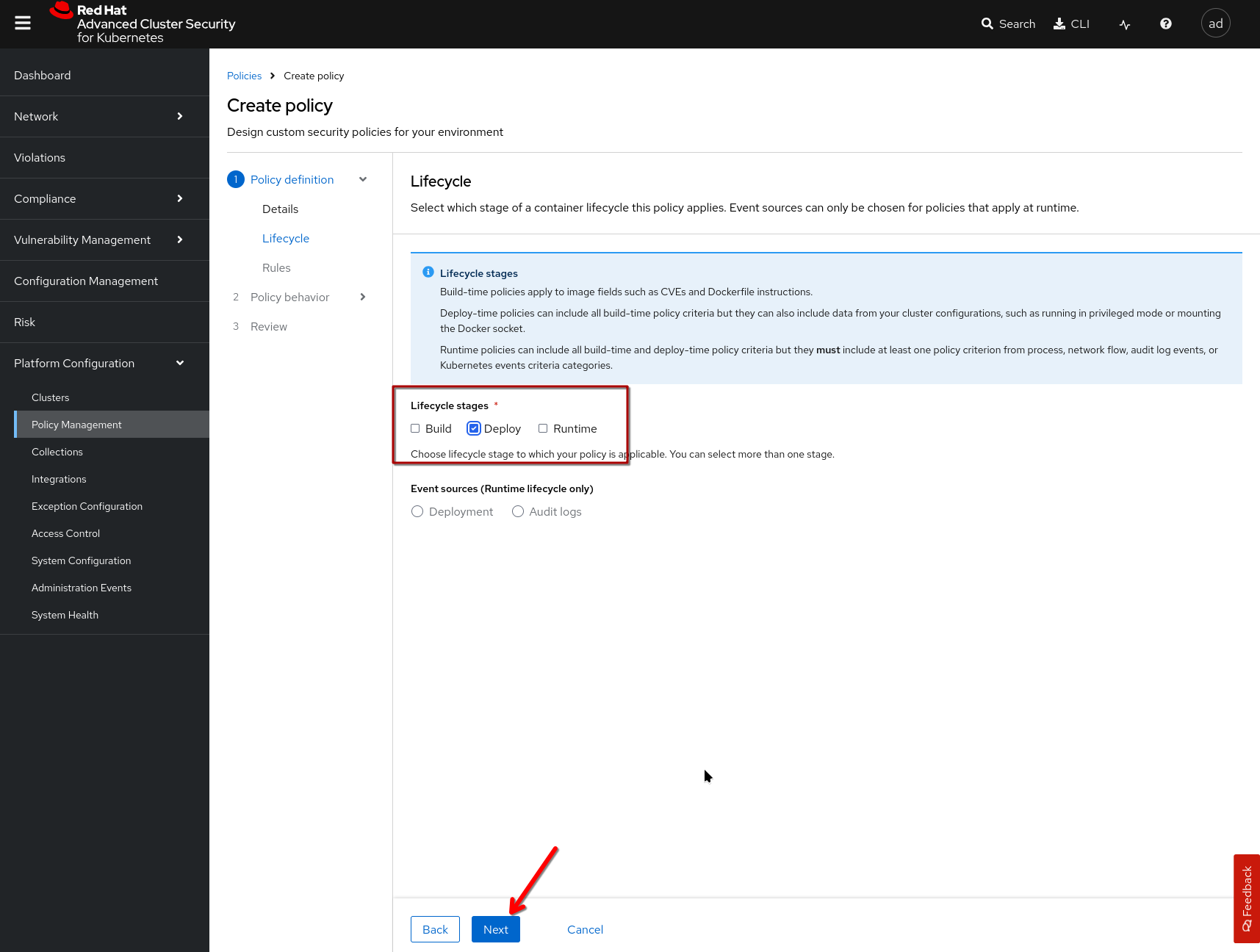
3) Select "Deploy" as the lifecycle stage (as that is relevant for admission control) and click "next"
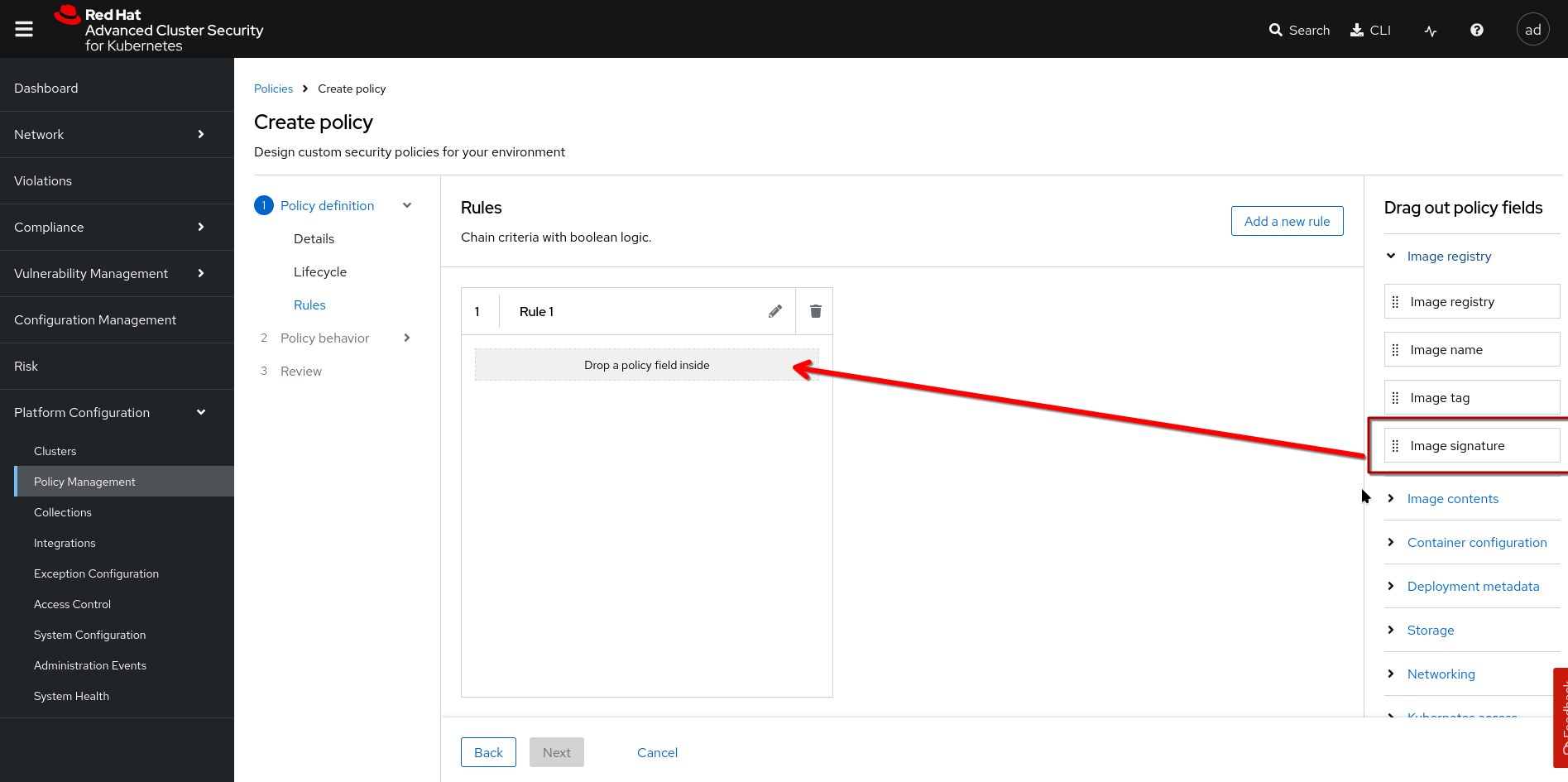
4) Define the rules that make up this policy. You start by "dragging and dropping", then configure the policy field you "dropped" (HINT: Drop it in the grey box, otherwise it won’t work)
Start with the "Image Signature"
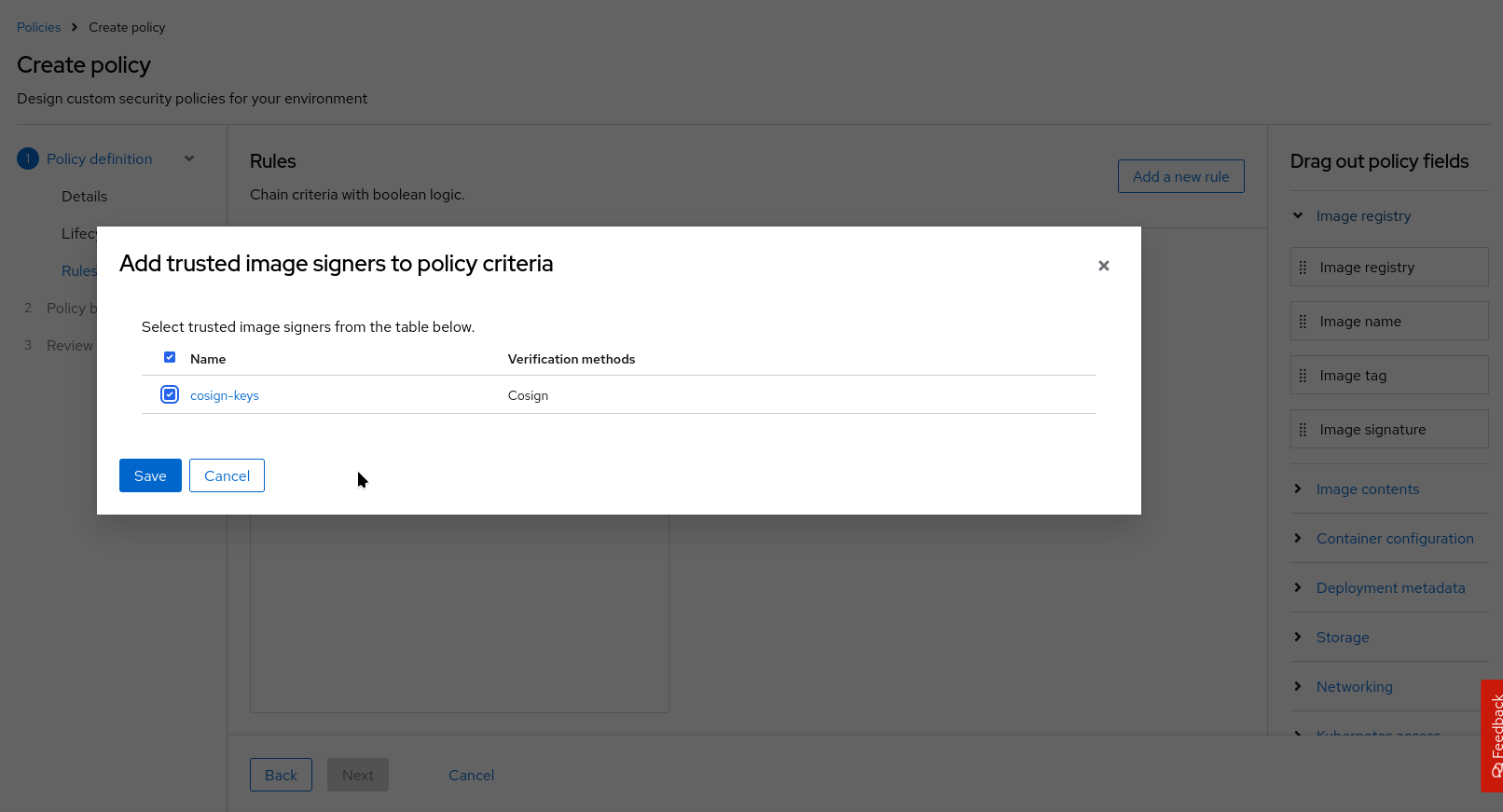
Then, configure your first rule by selecting an image signer (what we just created)
Click next and define an "Inclusion Scope"
| If you don’t restrict your policies by defining inclusion or exclusion scopes, the will automatically apply to all namespaces on all secured clusters! |
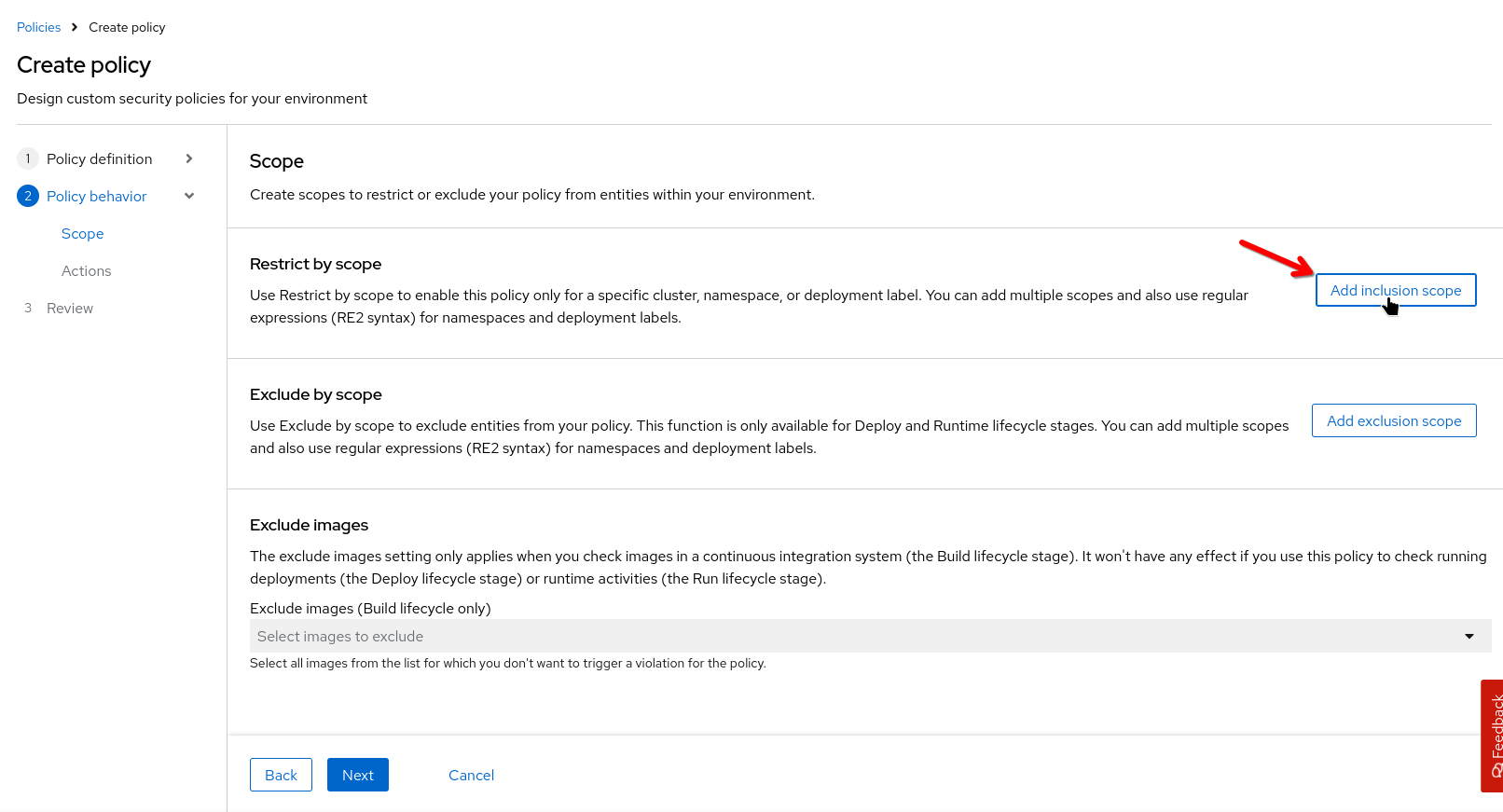
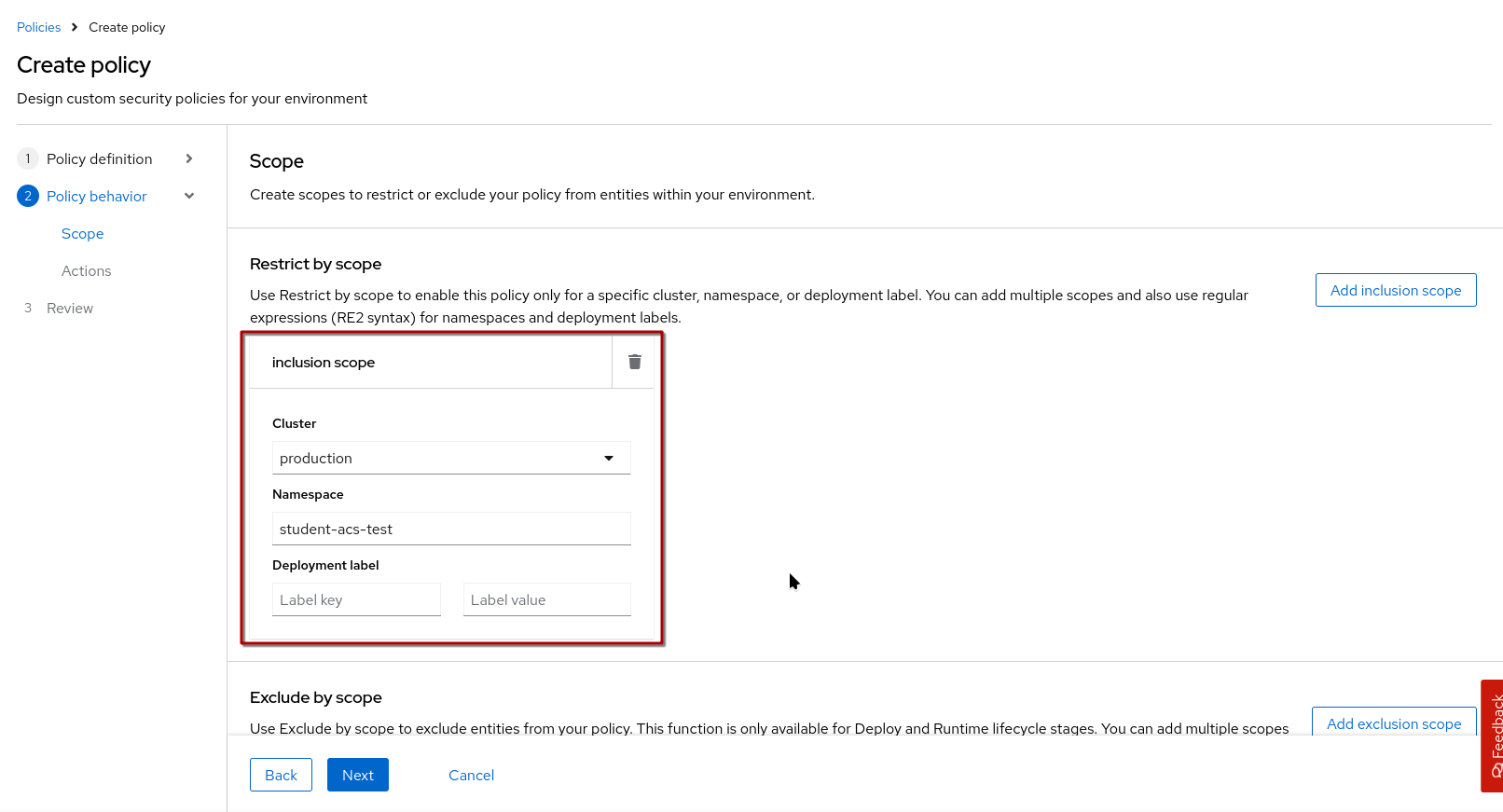
We’ll add our "production" cluster (it’s the only secured cluster we have in this environment) and our namespace student-acs-test
We could add more inclusion scopes and also work with RegEx for namespaces and deployment labels, but we’ll leave it at that.
Click next.
For "Actions", we’ll leave it at "Enabled" and "Inform" (for now).
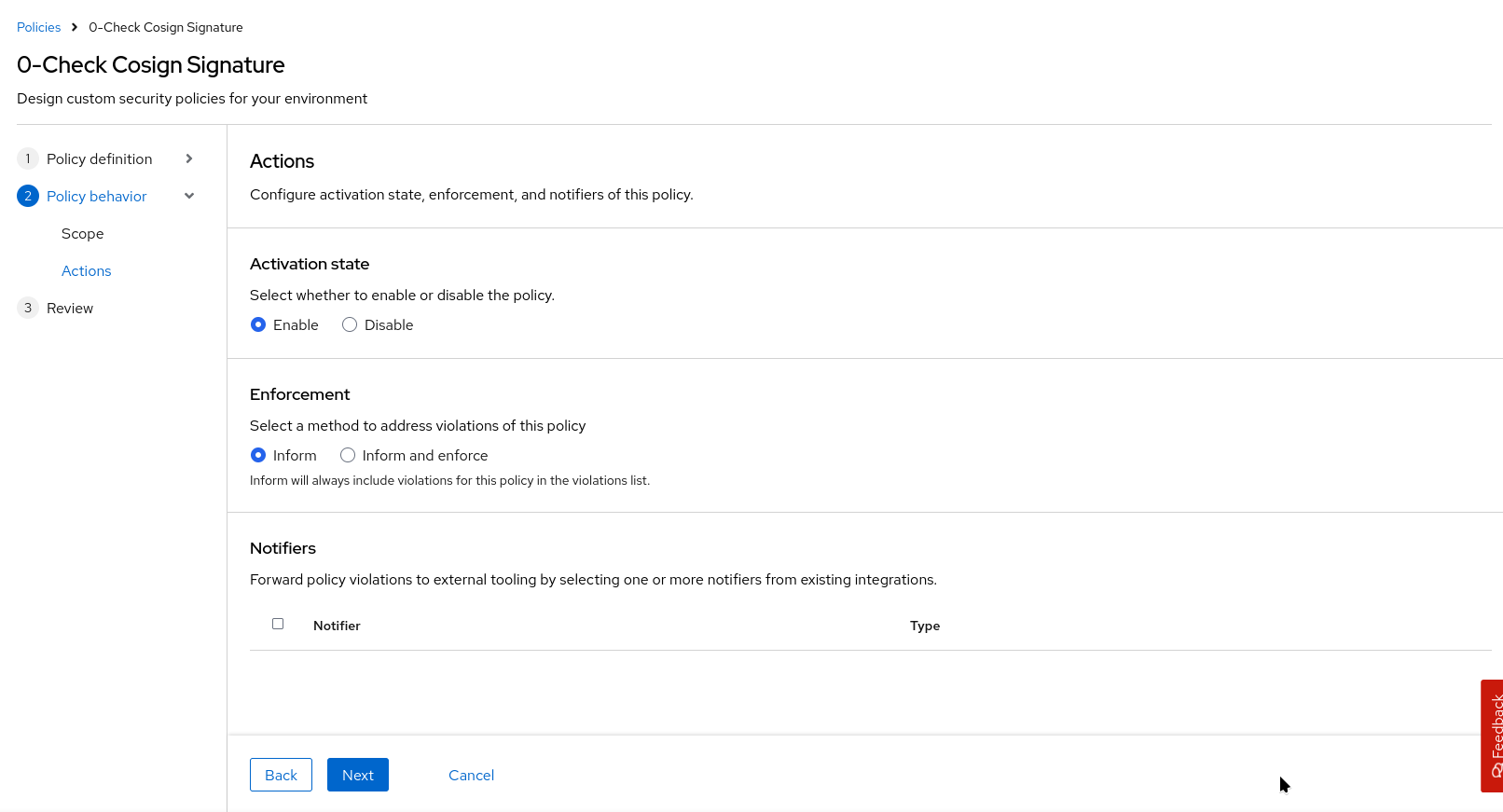
"Inform" is comparable to "warn" with the Sigstore Admission controller. It will issue a warning when we try to deploy an image that violates the policy. ACS has a "violations" dashboard, where this will pop up - and also "Notifiers" that would inform via e.g. Slack, Jira, etc (we haven’t defined any).
"Inform and Enforce" would additionally block the deployment, as you would expect from an admission controller.
|
We’re dealing with "Deploy" policies here - but depending on the lifecycle, "Enforce" has different consequences:
|
Click next, review and save.
We should now have our first policy, scoped to run on our student-acs-test namespace on "production" only.
It should verify if a valid signature by our cosign key is available and will also check if there is proof of that signing event in the Rekor transparency log.
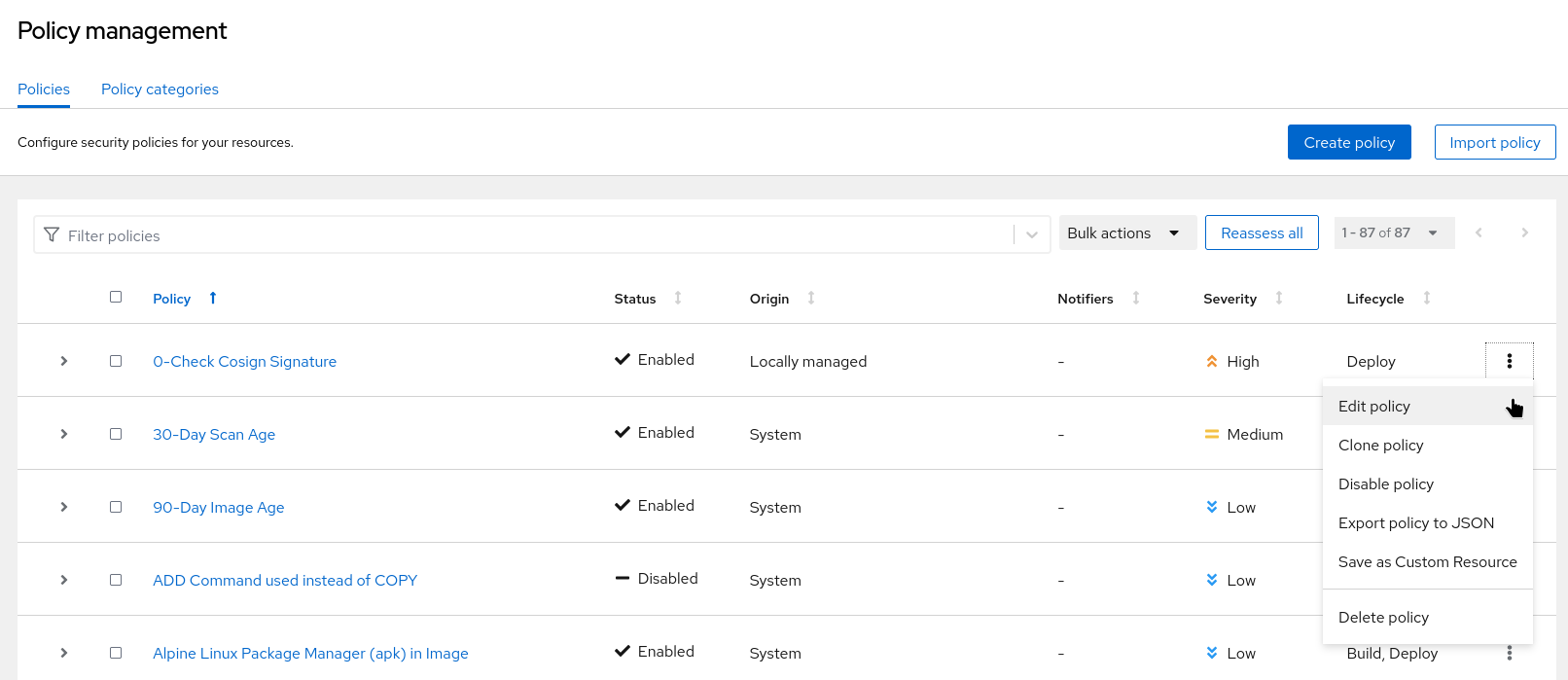
In our {acs_url}/main/policy-management/policies["Policy Management" View^,window="acs"] we should now see our policy.
You can edit it via the menu on the right, or just by clicking on its name and picking "Edit Policy" from the actions menu on the right.
Testing our first policy
Ok, let’s see what it does when we try to deploy our unsigned image to our student-acs-test namespace:
In the terminal run the following code again:
|
If you have restarted your cluster or terminal pod since you built the image, it will not have the |
oc project student-acs-test
cd /workspace/l3-enablement-helpers/tas-tssc/controllers/sigstore/prep/unsigned-image
source image.env
echo ""
echo "IMAGE: ${IMAGE}"
sed "s|\$IMAGE|$IMAGE|g" deploy.yaml | oc apply -f -
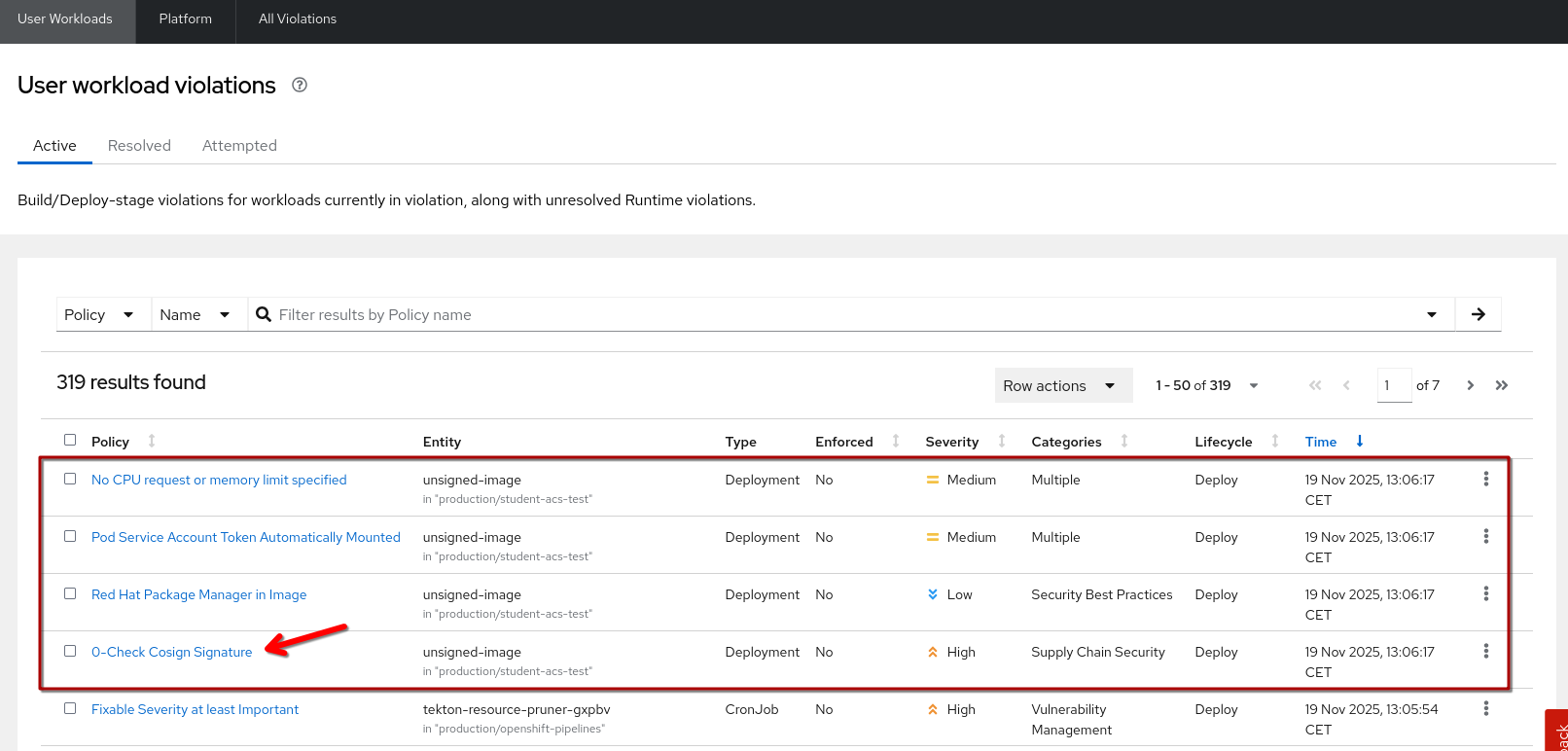
Ok, that worked, as expected (we’re just at "Inform" level) - but where is our warning?
IMAGE: quay-vtm4r.apps.cluster-vtm4r.dynamic.redhatworkshops.io/l3-students/l3-rhads-unsigned:2025-11-19_12-03
deployment.apps/unsigned-image created
service/unsigned-image created
route.route.openshift.io/unsigned-image created
It’s in the {acs_url}/main/violations?violationState=ACTIVE&filteredWorkflowView=Applications%20view[Violations Dashboard^,window="acs"] and would have triggered a notification to our Notifier of choice (if we had defined any):
So, let’s see what happens if we set it to "enforce":
From the {acs_url}/main/policy-management/policies["Policy Management" View^,window="acs"], use the menu on the right (as shown above) or open it and use the "Actions Menu"
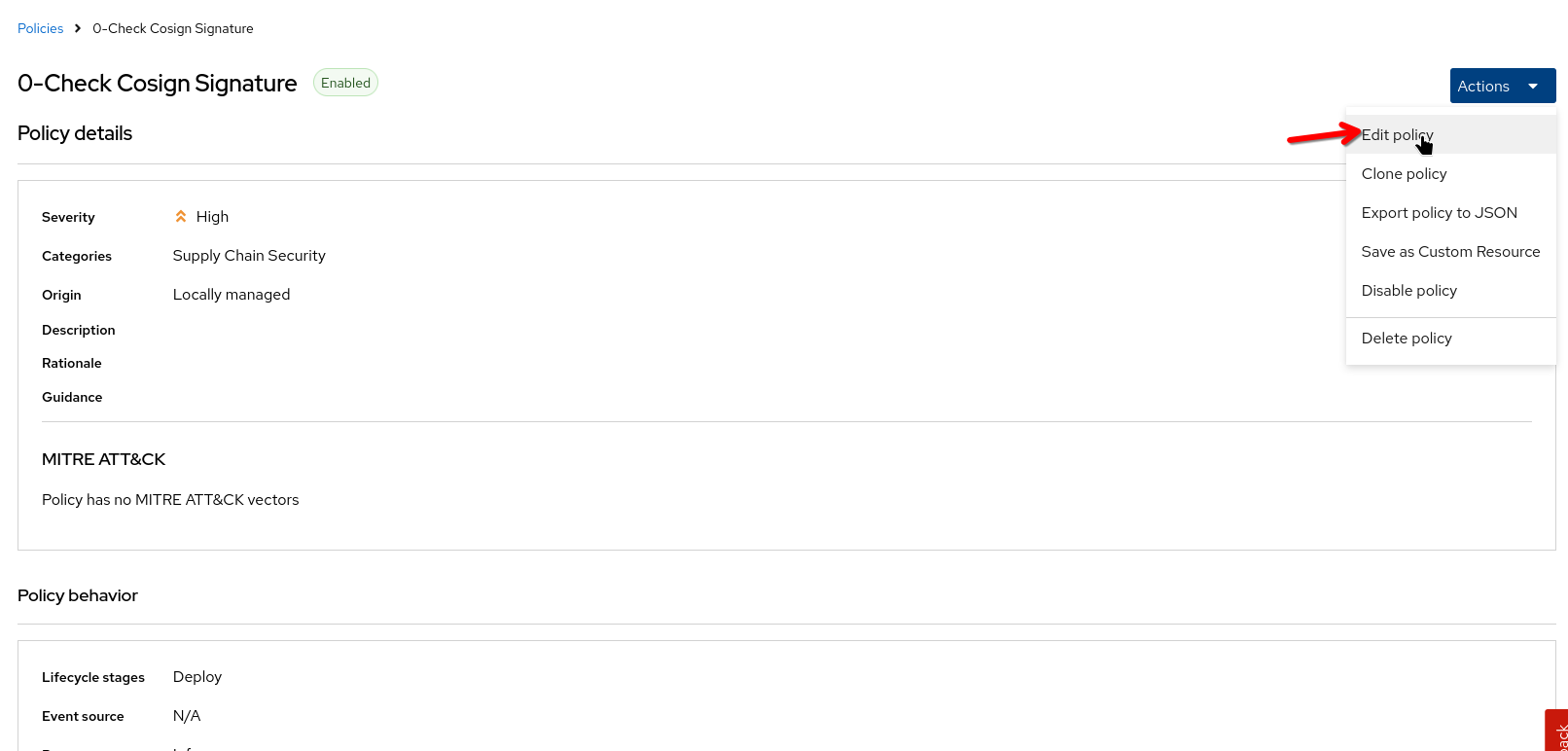
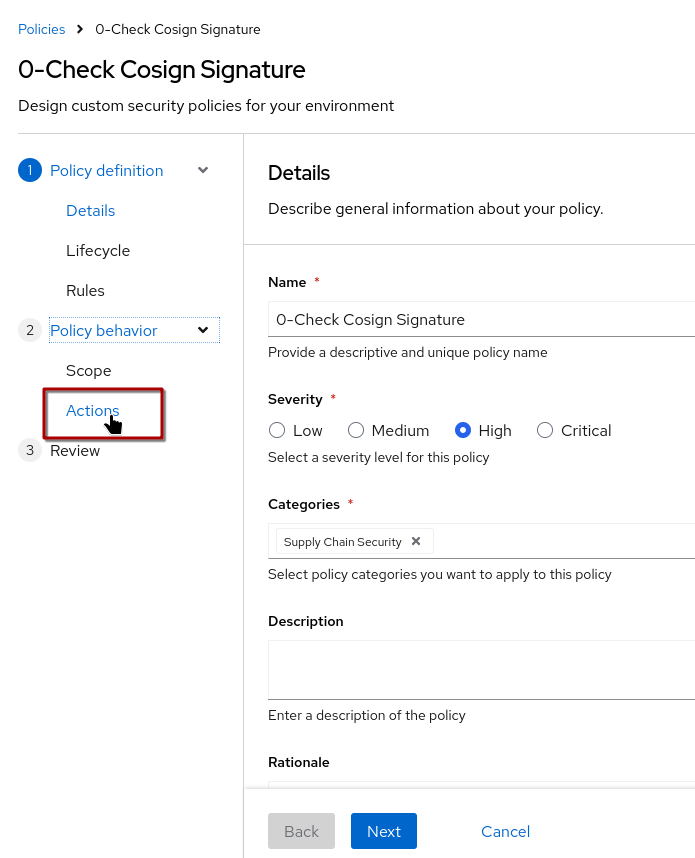
You can click through via "Next, Next, Next,…" or you can directly go to "Actions"
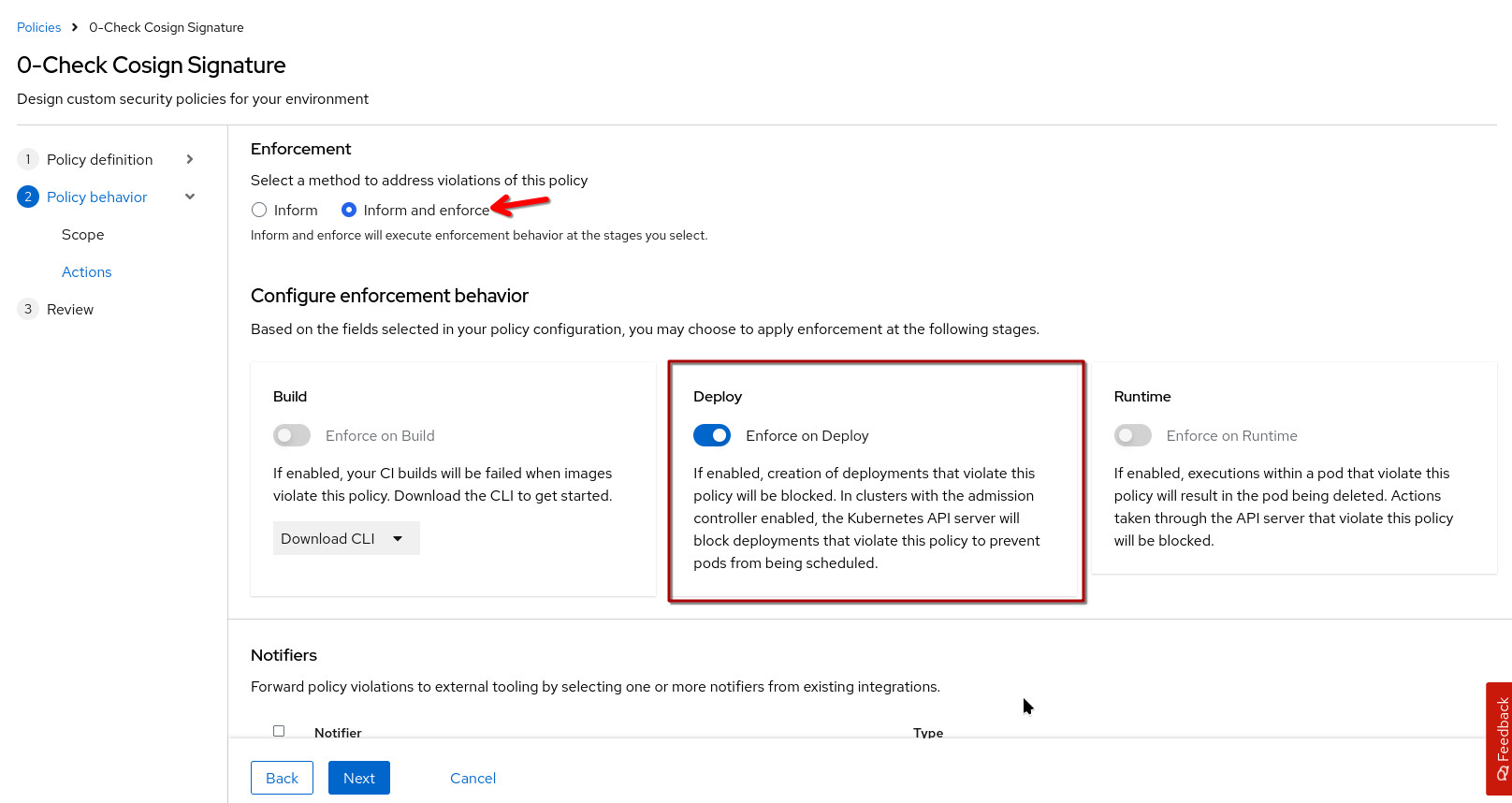
When you switch to "Inform & Enforce", you can tailor on which lifecycle stages the enforcement will actually happen. Since we defined this policy to only support the "Deploy" lifecycle, we can only enable "Enforce on Deploy". If we had a policy applicable to multiple stages, we could fine-tune where enforcement should happen.
Click "Next", then "Save"
Now, let’s try again in our terminal:
oc project student-acs-test
cd /workspace/l3-enablement-helpers/tas-tssc/controllers/sigstore/prep/unsigned-image
source image.env
echo ""
echo "IMAGE: ${IMAGE}"
sed "s|\$IMAGE|$IMAGE|g" deploy.yaml | oc apply -f -
Huh? All good? 🤔
IMAGE: quay-vtm4r.apps.cluster-vtm4r.dynamic.redhatworkshops.io/l3-students/l3-rhads-unsigned:2025-11-19_12-03
deployment.apps/unsigned-image unchanged
service/unsigned-image unchanged
route.route.openshift.io/unsigned-image unchanged|
That’s because no deployment is actually happening (deployment unchanged) - this is important to note: If the malicious image is already on the cluster, a deployment-scoped policy won’t act on it. A "runtime"-scoped would. |
ok, so let’s delete it first and then try again:
oc project student-acs-test
oc delete deployment unsigned-image
cd /workspace/l3-enablement-helpers/tas-tssc/controllers/sigstore/prep/unsigned-image
source image.env
echo ""
echo "IMAGE: ${IMAGE}"
sed "s|\$IMAGE|$IMAGE|g" deploy.yaml | oc apply -f -
A-ha! 💡 Now the Admission Controller enforces the policy and blocks the deployment - anf we had provided some meaningful Description, a rationale for the policy and common remediation strategies, these would also be shown here (and would appear in logs, etc.)
Error from server (Failed currently enforced policies from RHACS): error when creating "STDIN": admission webhook "policyeval.stackrox.io" denied the request:
The attempted operation violated 1 enforced policy, described below:

Policy: 0-Check Cosign Signature
- Description:
    ↳
- Rationale:
    ↳
- Remediation:
    ↳
- Violations:
    - Container 'unsigned-image' image signature is unverified


In case of emergency, add the annotation {"admission.stackrox.io/break-glass": "ticket-1234"} to your deployment with an updated ticket number
In addition to that, we can also find the Violation in the {acs_url}/main/violations?violationState=ATTEMPTED&filteredWorkflowView=Applications%20view["Attempted"^,window="acs"] view in ACS.
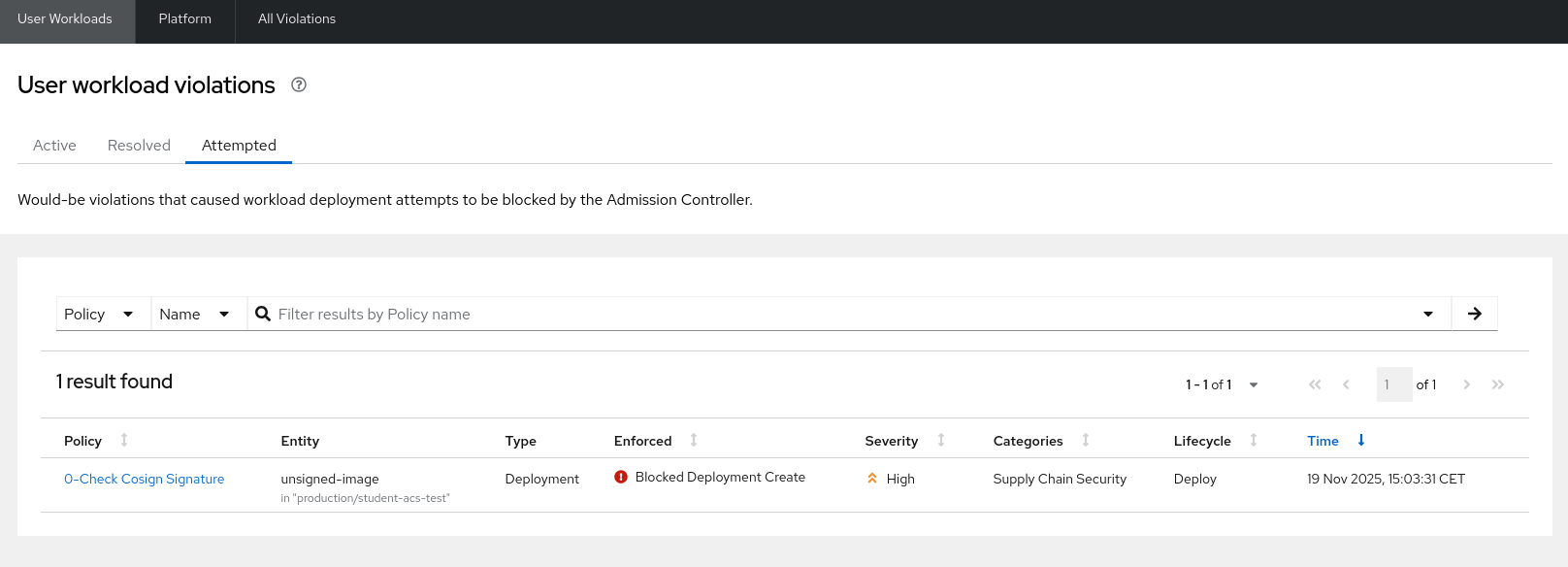
Control
OK, now we know our policy blocks an unsigned image - but would it allow an image singed with the correct key and inclusion proof in the Rekor transparency database?
Let’s try:
oc project student-acs-test
cd /workspace/l3-enablement-helpers/tas-tssc/controllers/sigstore/prep/signed-image-keys
source image.env
echo ""
echo "IMAGE: ${IMAGE}"
sed "s|\$IMAGE|$IMAGE|g" deploy.yaml | oc apply -f -
As expected, that worked ✅
IMAGE: quay-vtm4r.apps.cluster-vtm4r.dynamic.redhatworkshops.io/l3-students/l3-rhads-signed-key:2025-11-19_12-04
deployment.apps/signed-image-key created
service/signed-image-key created
route.route.openshift.io/signed-image-key created
A vulnerability-focused policy
Verifying image signatures is something that the Sigstore Admission Controller can do as well, so let’s add something that Sigstore can’t but ACS excels at: Scanning for vulnerabilities.
So, we’ll create a policy "0-no fixable vulnerabilities" that doesn’t allow any FIXABLE severity:
Since you’ve already learned how to create a policy:
-
Go to the {acs_url}/main/policy-management/policies[Policy Management View^,window="acs"]
-
Create a new policy with name
0-no fixable vulnerabilities-
Severity: High
-
Categories: Supply Chain Security
-
Description:
Verifies there are no fixable known vulnerabilities -
Rationale:
If a fix is available, we should try our best to incorporate it as soon as possible -
Guidance:
Use the "roxctl scan image" command or ask the security team for a detailed scan of the image, including "fixed by" data
-
-
Lifecycle
-
Assign it at least the
Deploylifecycle, but a policy like this could also be used duringBuild
-
-
Rules
-
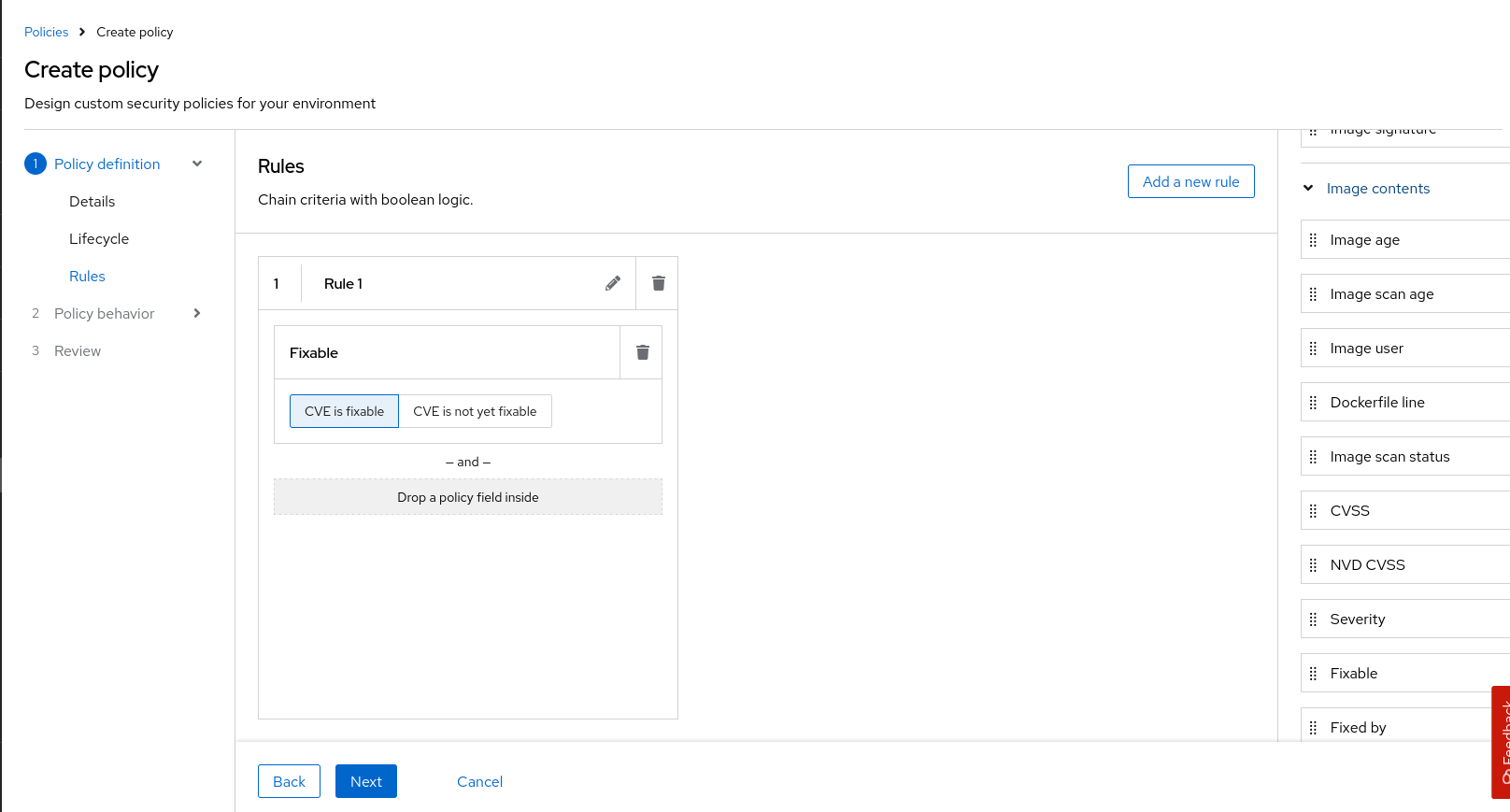
From the Image Contents section, drag the "Fixable" to the policy field. We could combine that with e.g. "Severity" to say , but we’ll leave it here.
-
-
Scope
-
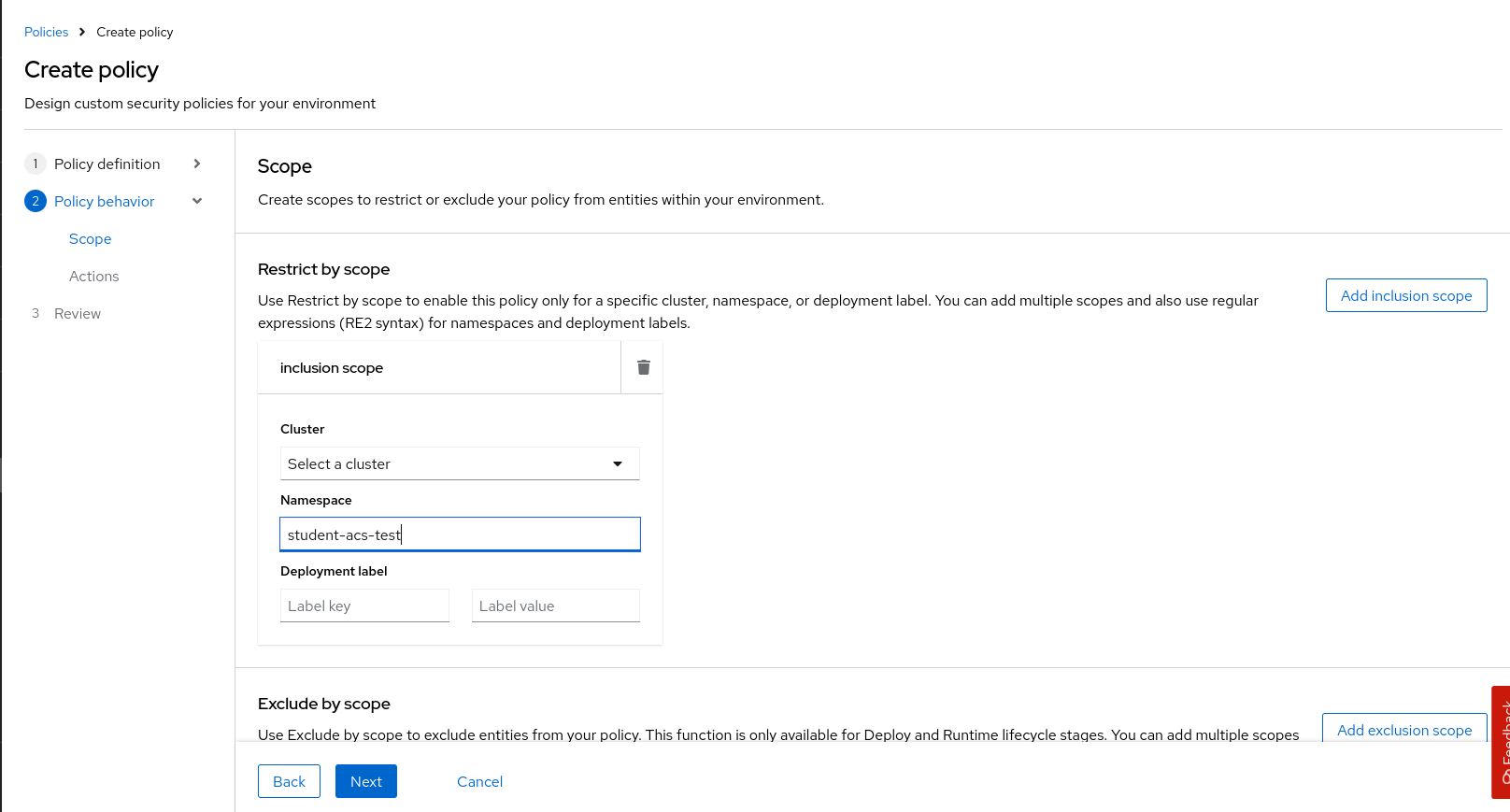
Add an Inclusion Scope
-
Cluster "Production"
-
Namespace
student-acs-test
-
-
-
Actions
-
Set "Inform and Enforce"
-
Enable enforcement on "Deploy" (note that you could also enforce on Build, as we had added that as a lifecycle in the beginning)
-
Click on the thumbnails to enlarge:
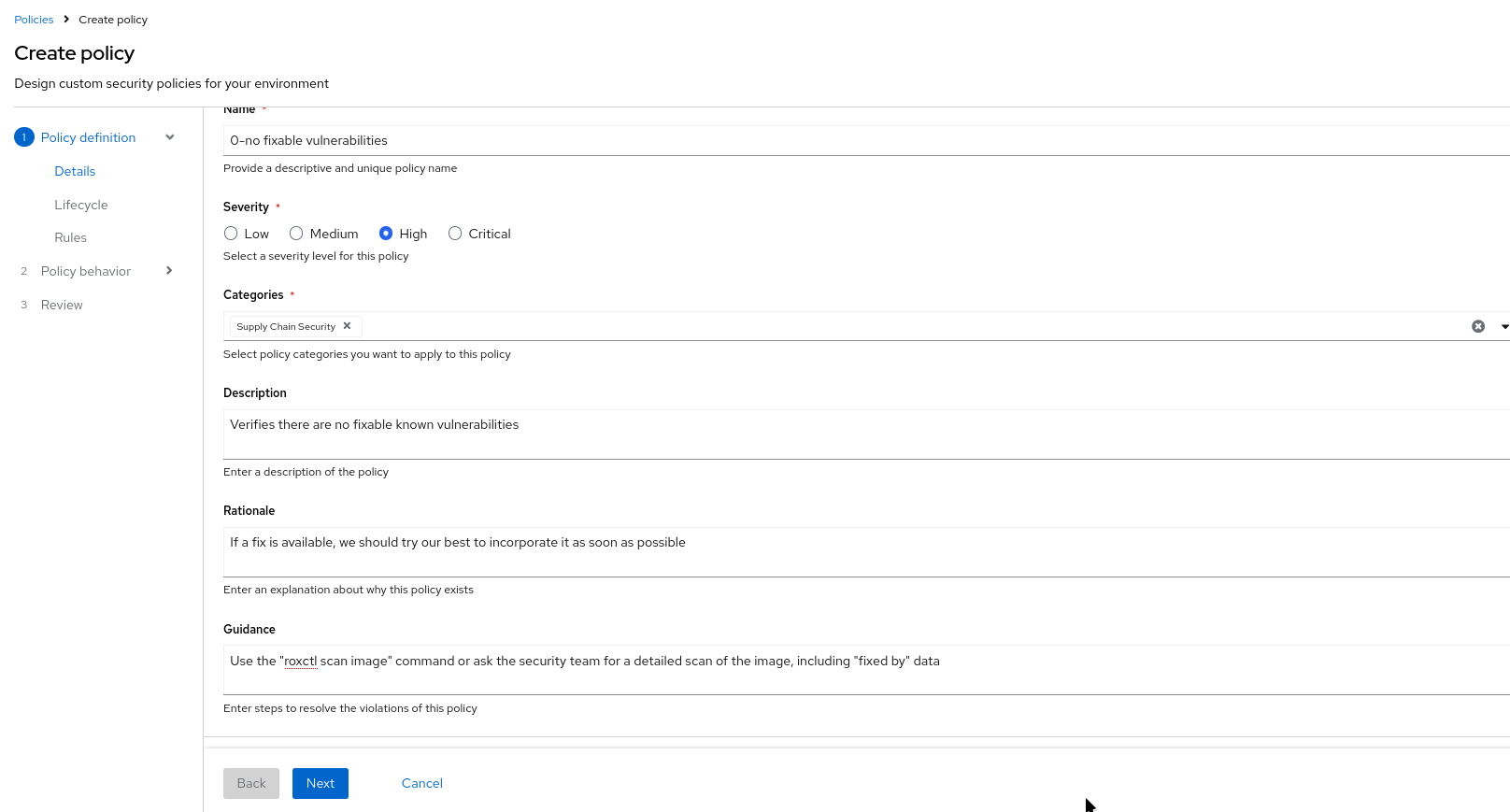
|
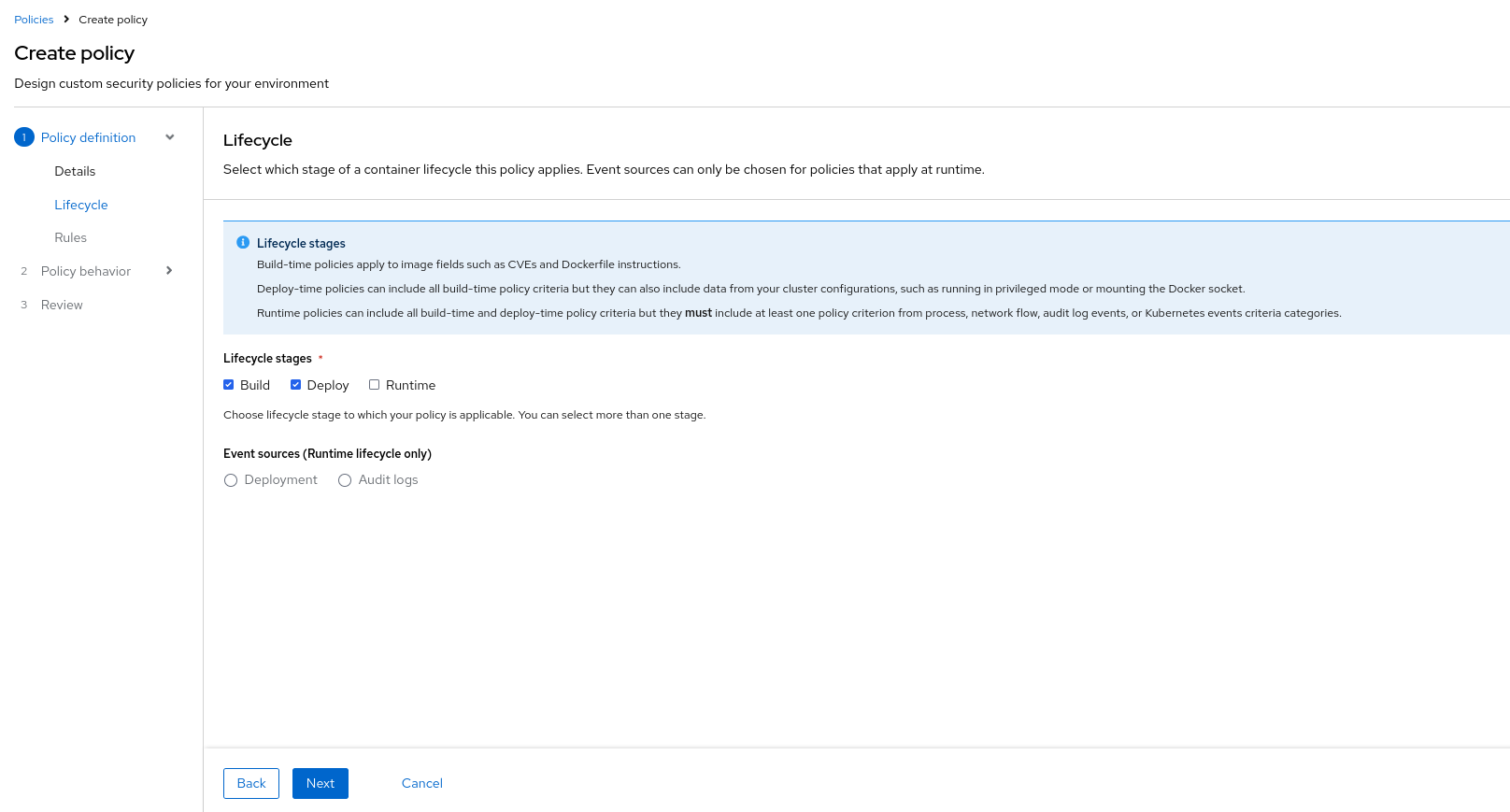
|
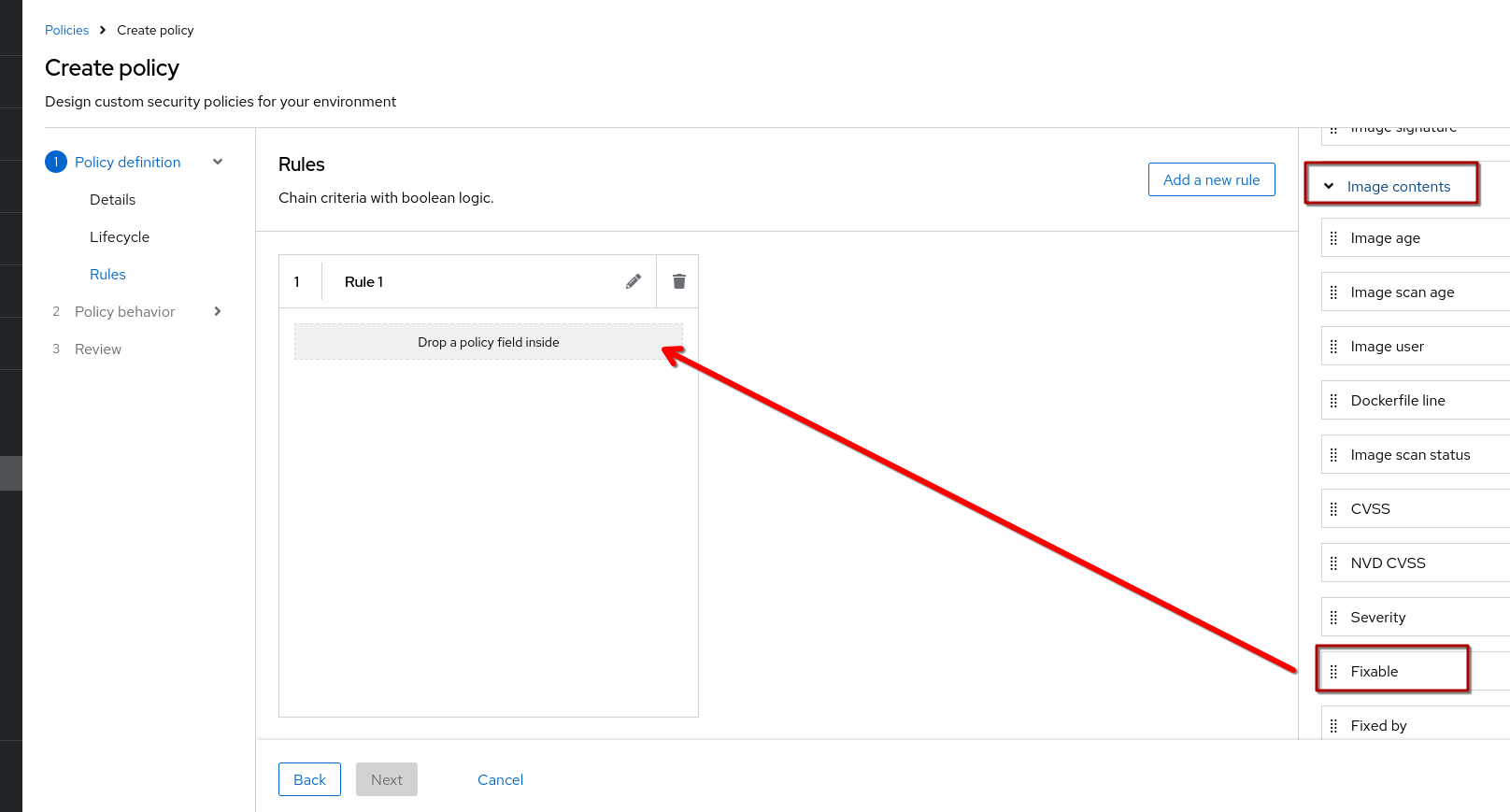
|
|
|
Note that you have a preview on the "Review" page, so you can directly check if your policy and scope is ok and also which deployments wouldn’t have gone through (since it is not a "Runtime" policy, there’s nothing it can do about it.)
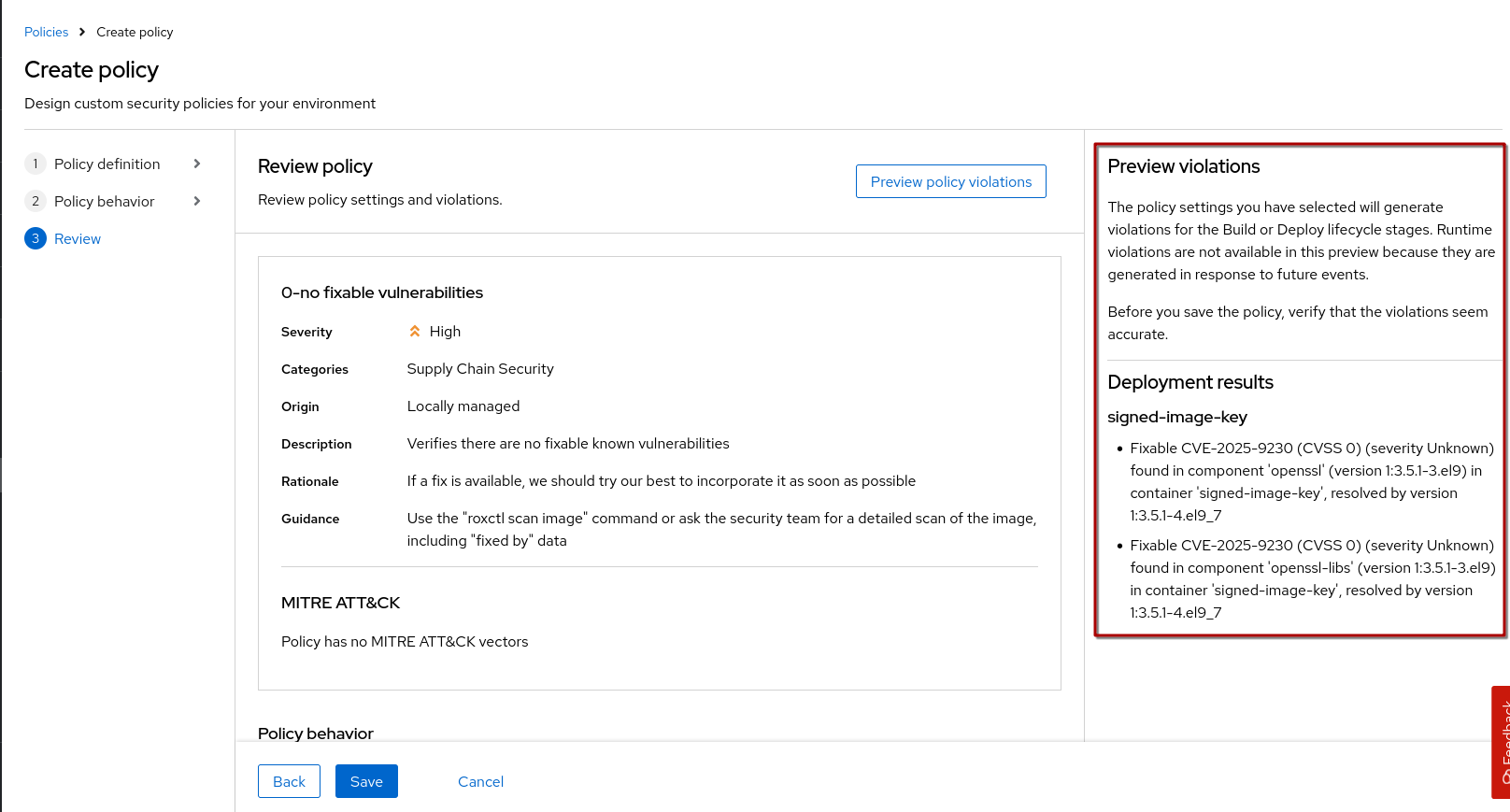
So, let us put this to the test:
oc project student-acs-test
oc delete deployment signed-image-key (1)
cd /workspace/l3-enablement-helpers/tas-tssc/controllers/sigstore/prep/signed-image-keys
source image.env
echo ""
echo "IMAGE: ${IMAGE}"
sed "s|\$IMAGE|$IMAGE|g" deploy.yaml | oc apply -f -| 1 | We need to delete the deployment first again, otherwise it’ll remain unchanged and nothing will be validated/enforced |
Now that we try to deploy this one, you can see it’s being blocked because of the fixable vulnerabilities present:
IMAGE: quay-vtm4r.apps.cluster-vtm4r.dynamic.redhatworkshops.io/l3-students/l3-rhads-signed-key:2025-11-19_17-45
service/signed-image-key unchanged
route.route.openshift.io/signed-image-key unchanged
Error from server (Failed currently enforced policies from RHACS): error when creating "STDIN": admission webhook "policyeval.stackrox.io" denied the request:
The attempted operation violated 1 enforced policy, described below:

Policy: 0-no fixable vulnerabilities
- Description:
    ↳ Verifies there are no fixable known vulnerabilities
- Rationale:
    ↳ If a fix is available, we should try our best to incorporate it as soon as
      possible
- Remediation:
    ↳ Use the "roxctl scan image" command or ask the security team for a detailed scan
      of the image, including "fixed by" data
- Violations:
    - Fixable CVE-2024-47252 (CVSS 0) (severity Unknown) found in component 'httpd' (version 2.4.62-4.el9) in container 'signed-image-key', resolved by version 0:2.4.62-4.el9_6.4
    - Fixable CVE-2024-47252 (CVSS 0) (severity Unknown) found in component 'httpd-core' (version 2.4.62-4.el9) in container 'signed-image-key', resolved by version 0:2.4.62-4.el9_6.4
    - Fixable CVE-2024-47252 (CVSS 0) (severity Unknown) found in component 'httpd-filesystem' (version 2.4.62-4.el9) in container 'signed-image-key', resolved by version 0:2.4.62-4.el9_6.4
    - Fixable CVE-2024-47252 (CVSS 0) (severity Unknown) found in component 'httpd-tools' (version 2.4.62-4.el9) in container 'signed-image-key', resolved by version 0:2.4.62-4.el9_6.4
    - Fixable CVE-2024-47252 (CVSS 0) (severity Unknown) found in component 'mod_ldap' (version 2.4.62-4.el9) in container 'signed-image-key', resolved by version 0:2.4.62-4.el9_6.4
    - Fixable CVE-2024-47252 (CVSS 0) (severity Unknown) found in component 'mod_lua' (version 2.4.62-4.el9) in container 'signed-image-key', resolved by version 0:2.4.62-4.el9_6.4
    - Fixable CVE-2024-47252 (CVSS 0) (severity Unknown) found in component 'mod_session' (version 2.4.62-4.el9) in container 'signed-image-key', resolved by version 0:2.4.62-4.el9_6.4
    - Fixable CVE-2024-47252 (CVSS 0) (severity Unknown) found in component 'mod_ssl' (version 1:2.4.62-4.el9) in container 'signed-image-key', resolved by version 1:2.4.62-4.el9_6.4
    - Fixable CVE-2024-56433 (CVSS 0) (severity Low) found in component 'shadow-utils' (version 2:4.9-12.el9) in container 'signed-image-key', resolved by version 2:4.9-15.el9
    - Fixable CVE-2025-23048 (CVSS 0) (severity Unknown) found in component 'httpd' (version 2.4.62-4.el9) in container 'signed-image-key', resolved by version 0:2.4.62-4.el9_6.4
    - Fixable CVE-2025-23048 (CVSS 0) (severity Unknown) found in component 'httpd-core' (version 2.4.62-4.el9) in container 'signed-image-key', resolved by version 0:2.4.62-4.el9_6.4
    [...]
In case of emergency, add the annotation {"admission.stackrox.io/break-glass": "ticket-1234"} to your deployment with an updated ticket number|
We’re building the images with a D-rated base image on purpose. If we built with |