Signing git commits
Why sign code commits?
Signing git commits establishes cryptographic proof of authorship and integrity at the earliest point in the software supply chain. Each signed commit creates a verifiable link between code changes and the developer’s identity, preventing impersonation and unauthorized code injection even if an attacker compromises repository credentials.
With Trusted Artifact Signer / Sigstore, this becomes particularly powerful because:
-
Commits are tied to verified OIDC identities (like a GitHub or Google or internal SSO account) rather than (self-)managed keys that could get lost or be shared
-
The signature and identity are recorded in an immutable, transparent public log (Rekor), providing auditability
-
Short-lived certificates eliminate the security risks of long-term key management and revocation
The key benefits are:
-
Authenticity: Verify that code truly came from who it claims to be from
-
Integrity: Detect any tampering with commit contents or history
-
Non-repudiation: Create an auditable trail that developers can use to prove innocence - or otherwise can’t later deny
-
Trust propagation: Downstream systems (CI/CD, artifact signing, deployment) can verify the entire chain from source to production
-
Incident response: Quickly identify all code from a compromised account
In an end-to-end secured supply chain, signed commits form a root of trust — without them, security controls have an unverified foundation.
Why Access Controls Aren’t Enough
Why not simply lock down access to the git repository?
Access controls are necessary but not sufficient for several critical reasons:
Access Controls Don’t Prevent Identity Spoofing
Git’s author field is just unverified metadata. Anyone with write access can commit as anyone else:
git config user.name "Linus Torvalds"
git config user.email "torvalds@linux-foundation.org"
# Now all commits appear to be from Linus
Access controls only verify you can push — not that you are who you claim to be in the commit.
Credentials Get Compromised
-
Stolen tokens/passwords: Phishing, malware, leaked credentials in logs
-
Compromised accounts: Attackers gain legitimate access (SolarWinds, Codecov breaches)
-
Insider threats: Malicious employees with proper access
-
Platform compromises: GitHub/GitLab themselves could be breached
Access controls can’t detect misuse of legitimate credentials.
No Chain of Custody After Code Leaves the Repo
Once you clone/pull code:
-
How do you know it wasn’t tampered with in transit?
-
How do you verify it in air-gapped or offline environments?
-
Your CI/CD pipeline can’t verify authenticity based on repository ACLs
Signatures travel with the code; access controls don’t.
Auditability and Non-Repudiation
Access logs show who could have pushed, not cryptographic proof of who did. With signed commits:
-
Developers can prove legitimate behaviour - and can’t deny authorship
-
Code provenance for compliance can be proven
-
Integrity of the entire history can be verified, even years later
Bottom line: Access controls are perimeter defense. Signatures are cryptographic proof that survives compromised accounts, insider threats, and platform breaches—protecting the entire supply chain, not just the repository boundary.
Signing git commits
For interacting with git we’re using the gitsign cli tool. However, to use it, we also need the "trust root" from the TUF endpoint (which is downloaded to the user home under ~/.sigstore - also see the output from the cosign initialize command, which outputs the location of the local and remote trust root )
If you have already done it in the previous step, you can skip it, but we need to issue cosign initialize at least once for the local environment to be initialized.
So, let’s open our Podman Terminal again and
cd /workspace
cosign initialize
In our preparations, we created an empty git repository that we will clone now and commit to it. We could do that from the GitLab UI (the repository is {gitlab_url}/l3-students/signing-and-verification[here^,window="gitlab"], sign in with {gitlab_user} and {gitlab_user_password}) - but since we have the terminal open, why not use it?
cd /workspace
git clone {gitlab_url}/l3-students/signing-and-verification.git
cd signing-and-verification
git switch --create main
touch README.md
git add README.md
git status
Cloning into 'signing-and-verification'...
warning: You appear to have cloned an empty repository.
Switched to a new branch 'main'
On branch main
No commits yet
Changes to be committed:
(use "git rm --cached <file>..." to unstage)
new file: README.mdBefore we actually commit, let’s quickly review our git environment
git config --global --list...
commit.gpgsign=true
tag.gpgsign=true
gpg.x509.program=gitsign
gpg.format=x509
...This section tells git to use gpg-style signing (similar to the "traditional" private key based signing), the format (x509) and which program should provide the key/certificate. In our case, this is gitsign (that we pre-installed for your convenience).
...
gitsign.fulcio=https://fulcio-server-tssc-tas.apps.cluster-qkw52.dynamic.redhatworkshops.io
gitsign.issuer=https://sso.apps.cluster-qkw52.dynamic.redhatworkshops.io/realms/trusted-artifact-signer
gitsign.rekor=https://rekor-server-tssc-tas.apps.cluster-qkw52.dynamic.redhatworkshops.io
gitsign.clientid=trusted-artifact-signer
...
This section tells gitsign where the various endpoints are, so it can request a signing certificate and where it can store the signing event metadata.
We have chosen this path for convenience - with this configuration, git will automatically sign every commit (and tag) we create. For sake of completeness - we could also just commit without signing and then sign the commit later, using the gitsign binary directly, using the commit hash.
|
Now, let’s commit this change:
unset SIGSTORE_ID_TOKEN #if still around from the previous exercise, gitsign would use it
git commit -m "added an empty README.MD"
Again, you’ll be asked to copy the URL to a browser, login and then copy the result to the terminal again (if you’re not asked to login, but directly see the code, that’s because your Keycloak login session is still active. )
If you’d run this from your workstation (as a regular developer would do), the browser window would open directly - and if your session was still valid, you would just see a success message.
| Don’t worry if "nothing happens" when you paste the code to your terminal session - gitsign doesn’t echo the code. Just hit return after pasting. If it doesn’t work, the commit won’t happen and you can try again. |
podman-terminal:/workspace/signing-and-verification [+]$ unset SIGSTORE_ID_TOKEN #if still around from the previous exercise, gitsign would use it
git commit -m "added an empty README.MD"
error opening browser: exec: "xdg-open": executable file not found in $PATH
Go to the following link in a browser:

         https://sso.apps.cluster-qkw52.dynamic.redhatworkshops.io/realms/trusted-artifact-signer/protocol/openid-connect/auth?access_type=online&client_id=trusted-artifact-signer&code_challenge=RsKP9nk7eE46s1SjfATmpVJ71Cwqezf4b2-hD1mheMk&code_challenge_method=S256&nonce=34fKmq5ZXx3ntLnEe2mEoXm3yZe&redirect_uri=urn%3Aietf%3Awg%3Aoauth%3A2.0%3Aoob&response_type=code&scope=openid+email&state=34fKmnw1ITfl9ycQzmRo7BNFu3p
Enter verification code:
tlog entry created with index: 17
[main (root-commit) cb4b938] added an empty README.MD
 1 file changed, 0 insertions(+), 0 deletions(-)
 create mode 100644 README.md
Now that we have signed the commit - we should also push it to our repo:
Use {gitlab_user} and {gitlab_user_password} for login to GitLab when pushing.
git pushpodman-terminal:/workspace/signing-and-verification (main)$ git push
Username for 'https://gitlab-gitlab.apps.cluster-v9q9c.dynamic.redhatworkshops.io': user1
Password for 'https://user1@gitlab-gitlab.apps.cluster-v9q9c.dynamic.redhatworkshops.io':
Enumerating objects: 3, done.
Counting objects: 100% (3/3), done.
Writing objects: 100% (3/3), 1.38 KiB | 1.38 MiB/s, done.
Total 3 (delta 0), reused 0 (delta 0), pack-reused 0 (from 0)
To https://gitlab-gitlab.apps.cluster-v9q9c.dynamic.redhatworkshops.io/l3-students/signing-and-verification.git
* [new branch] main -> mainOn GitLab, the repository will now look like this:
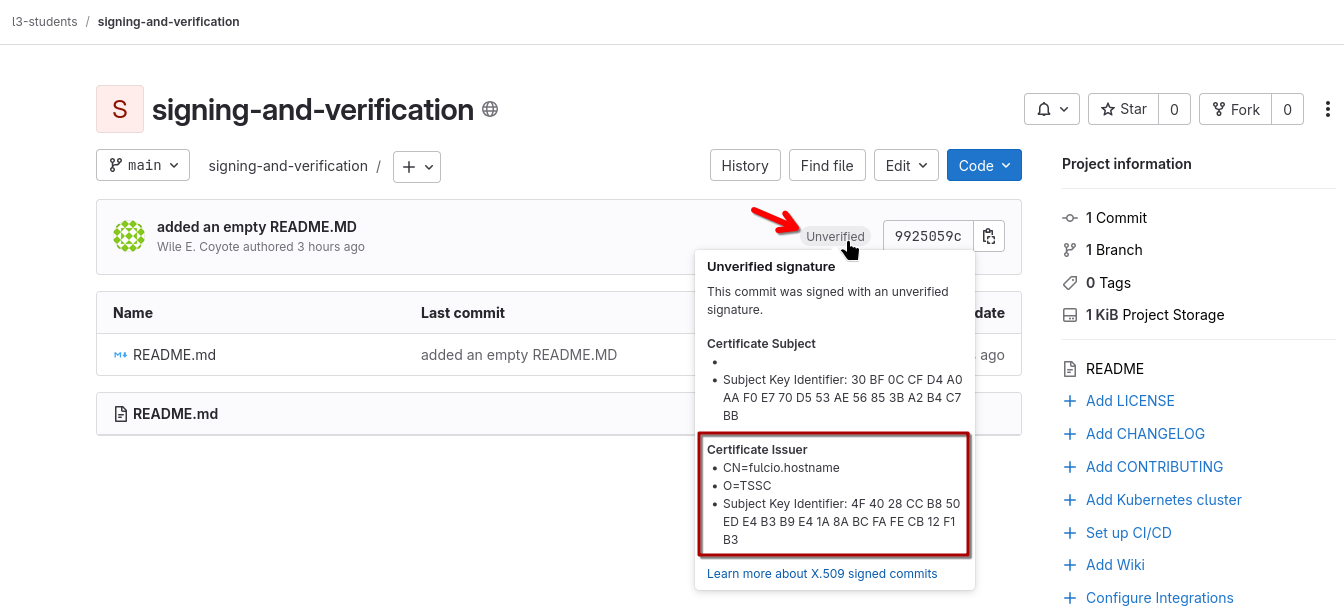
GitLab recognises the signature, and we can check the details (we see the trust root / certificate issuer configuration that was added during TAS installation).
However, GitLab cannot verify the signature as it doesn’t support sigstore signatures, only "traditional" key-pair based signatures. For it to verify, we would have to add the trust root public certificates.
We have those (they’re actually downloaded from TAS each time you issue a cosign initialize) - BUT since we’re signing with ephemeral signing certificates and GitLab doesn’t know anything about Rekor / Transparency Logs - it would only verify the signature for 10mins - after that, the keys expire and it would again list the commit as "unverified".
Verifying git commits
At some point in our downstream tool chain, we’d want to verify that a commit we want to build is from a trustworthy source.
In other words, we want to verify that
-
the commit has been signed and the signature is valid (Integrity - it hasn’t been tampered with since its commit)
-
who it came from (Non-repudiation, not just blind trust "we’ll trust everything from that repo, because the access controls will be good enough")
Since our commit was signed with Trusted Artifact Signer and the OIDC identity of the signer is part of the certificate, we can do that.
To verify the commit signature, we’ll use gitsign verify - however, the traditional git signature verification means also work (git log --show-signature, git verify-commit), but they don’t verify the inclusion of the OIDC Identity and OIDC Issuer for that identity (called "certificate claims"), therefore are less secure and can’t be used for verification of our second objective.
podman-terminal:/workspace/signing-and-verification (main)$ git log --show-signature -1
commit 9925059cd82fc302cbc1e2340ec756ed336fb925 (HEAD -> main, origin/main)
tlog index: 0
gitsign: Signature made using certificate ID 0xb551af696f7e5460fb8c7a4201e9f83b42b79ec2 | CN=fulcio.hostname,O=TSSC
gitsign: Good signature from [user1@demo.redhat.com](https://sso.apps.cluster-v9q9c.dynamic.redhatworkshops.io/realms/trusted-artifact-signer)
Validated Git signature: true
Validated Rekor entry: true
Validated Certificate claims: false
WARNING: git verify-commit does not verify cert claims. Prefer using `gitsign verify` instead.
Author: Wile E. Coyote <boom@acme.com>
Date:   Tue Oct 28 14:39:58 2025 +0000

    added an empty README.MD
podman-terminal:/workspace/signing-and-verification (main)$ git verify-commit HEAD
tlog index: 0
gitsign: Signature made using certificate ID 0xb551af696f7e5460fb8c7a4201e9f83b42b79ec2 | CN=fulcio.hostname,O=TSSC
gitsign: Good signature from [user1@demo.redhat.com](https://sso.apps.cluster-v9q9c.dynamic.redhatworkshops.io/realms/trusted-artifact-signer)
Validated Git signature: true
Validated Rekor entry: true
Validated Certificate claims: false
WARNING: git verify-commit does not verify cert claims. Prefer using `gitsign verify` instead.|
As you can tell from the
And we pushed as GitLab user So, actually, we can’t trust the git author - and the |

With gitsign verify we have the means to verify not only the signature (and this the commit’s integrity) but also the certificate claims - who signed it and which system proved the identity.
So, depending on who you authored the signature with (when you followed the URL and copied the access code) - use this to verify both:
gitsign verify --certificate-identity=user1@demo.redhat.com --certificate-oidc-issuer=$SIGSTORE_OIDC_ISSUER HEADpodman-terminal:/workspace/signing-and-verification (main)$ gitsign verify --certificate-identity=user1@demo.redhat.com --certificate-oidc-issuer=$SIGSTORE_OIDC_ISSUER HEAD
tlog index: 0
gitsign: Signature made using certificate ID 0xb551af696f7e5460fb8c7a4201e9f83b42b79ec2 | CN=fulcio.hostname,O=TSSC
gitsign: Good signature from [user1@demo.redhat.com](https://sso.apps.cluster-v9q9c.dynamic.redhatworkshops.io/realms/trusted-artifact-signer)
Validated Git signature: true
Validated Rekor entry: true
Validated Certificate claims: trueOr, if we want to be lenient - we can just verify the signature and its authenticity, as well as that it was signed by someone (could be anyone) who authenticated against any OIDC system in the redhatworkshops.io domain:
gitsign verify --certificate-identity-regexp=.* --certificate-oidc-issuer-regexp='.*\.redhatworkshops\.io(/.*)?$' HEADpodman-terminal:/workspace/signing-and-verification (main)$ gitsign verify --certificate-identity-regexp=.* --certificate-oidc-issuer-regexp='.*\.redhatworkshops\.io(/.*)?$' HEAD
tlog index: 0
gitsign: Signature made using certificate ID 0xb551af696f7e5460fb8c7a4201e9f83b42b79ec2 | CN=fulcio.hostname,O=TSSC
gitsign: Good signature from [user1@demo.redhat.com](https://sso.apps.cluster-v9q9c.dynamic.redhatworkshops.io/realms/trusted-artifact-signer)
Validated Git signature: true
Validated Rekor entry: true
Validated Certificate claims: true|
You might have noticed that we are just verifying the HEAD signature (the last commit). Depending on your requirements, you can iterate through the git log and verify each commit down to a desired depth, ensuring nothing unsigned was added after a secure baseline. Instead of |