Preparation
Terminal and helper scripts
To prepare our environment for our Admission Controller exercise, please open the Podman Terminal.
If not already done, please clone the scripts repository:
cd /workspace
git clone https://github.com/redhat-tssc-tmm/l3-enablement-helpers.git
cd l3-enablement-helpers/tas-tssc/controllers/sigstore/prep|
If you have done some or all previous exercises, some or all of the scripts we use in the following preparation will seem familiar. |
Quay Organisation
To separate our images from other exercises, we’ll create a new Quay organisation, under which we’ll store our test images:
cd /workspace/l3-enablement-helpers/tas-tssc/controllers/sigstore/prep
./create-quay-org.sh
You should now have a (new) {quay_url}/organization/l3-students[Quay Organisation l3-students^,window="quay"]
Test Images
We need to build three images, but we have to make sure these are different (not three tags of the same), so we don’t inadvertently share the same sha256 fingerprint.
We’ll use three very simple images based on a Red Hat http server image, serving three different static pages.
You can find the Containerfile in the respective directories.
Unsigned Image
cd /workspace/l3-enablement-helpers/tas-tssc/controllers/sigstore/prep/unsigned-image
./build.sh
This simply builds the image and pushes it to the l3-students organisation we just created.
Image signed with a key
cd /workspace/l3-enablement-helpers/tas-tssc/controllers/sigstore/prep/signed-image-keys
./build.sh
This builds the image and signs it with cosign, but with the key that we stored in the signing-secrets secret in the openshift-pipelines namespace (well, actually Tekton Chains did, since it is configured that way. It uses the same key pair).
cosign sign --key k8s://openshift-pipelines/signing-secrets $IMAGE
Image signed keylessly
For keyless signing, we could sign the image interactively (as we’ve done in previous exercises), but we’ll do it with an OIDC access token instead - still tying the signature to an OIDC identity, but non-interactively.
Please inspect the script (and/or follow the Module 7 exercise "Image Signing & Verification"):
1) We’ll create a user pipeline-auth@demo.redhat.com in the Keycloak Realm that RHTAS is using
2) We’ll obtain the OIDC access token for that user via the Keycloak API
3) We’ll build and push the image
4) We’ll sign the image using the user’s (short-lived) access token
For your convenience, it’s all bundled into the one build.sh script, but feel free to explore what and how we’re doing there.
cd /workspace/l3-enablement-helpers/tas-tssc/controllers/sigstore/prep/signed-image-keyless
./build.sh
Just to verify we have signed with the correct user:
cd /workspace/l3-enablement-helpers/tas-tssc/controllers/sigstore/prep/signed-image-keyless
source image.env
cosign verify --certificate-identity=pipeline-auth@demo.redhat.com $IMAGE | jq
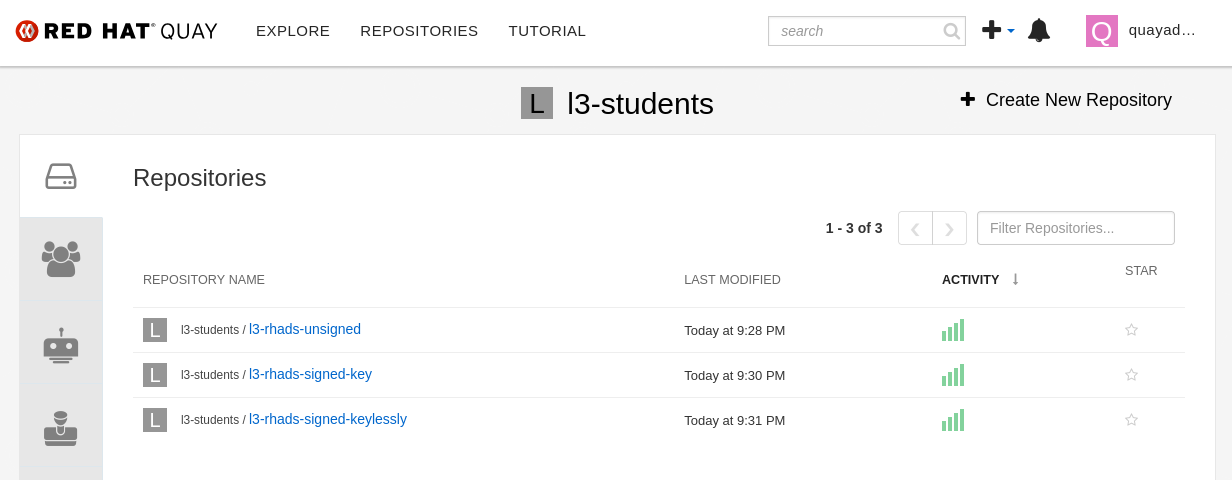
We should now have our three repositories under the {quay_url}/organization/l3-students[l3-students organisation^,window="quay"]: